

Proactive IT monitoring is transforming how businesses support remote and hybrid teams. Imagine an employee’s VPN connection drops just minutes before a major client presentation. Another team member’s laptop suddenly slows to a crawl, crippling their productivity for the afternoon. In a traditional office, they might walk over to the IT department for a quick fix. But in a remote or hybrid work environment, these small issues can snowball into major disruptions, leaving employees feeling isolated and IT teams scrambling to troubleshoot problems they can’t physically see. The shift to distributed work has created a new set of IT challenges, where problems often aren’t reported until they’ve already caused significant downtime. This reactive, “break-fix” model of IT support is no longer sustainable. The solution lies in shifting from firefighting to prevention.
This is where proactive IT monitoring becomes essential. Instead of waiting for a user to submit a help desk ticket, this approach uses sophisticated tools to constantly watch over your network, devices, and applications. It identifies potential issues and resolves them before they impact your team, ensuring a stable, secure, and productive work environment for everyone, no matter where they log in from.
Moving from Reactive to Predictive Support
The traditional IT support model is simple: something breaks, an employee reports it, and IT fixes it. The problem with this approach in a remote setting is the significant lag time. The employee first has to recognize the issue, then take the time to report it, and finally, the IT team has to diagnose it from a distance. This process can take hours, or even days, during which productivity suffers.
Proactive IT monitoring flips this model on its head. It involves deploying software agents on endpoints (like laptops and servers) that continuously collect performance data. These agents monitor everything from CPU usage and memory consumption to network connectivity and application health. They are programmed to recognize early warning signs of trouble. For instance, if a laptop’s hard drive starts showing signs of failure or a critical software service repeatedly crashes in the background, the monitoring system can automatically create a ticket for the IT team. This allows them to investigate and resolve the issue long before the employee even notices a problem. This shift turns your IT department from a reactive emergency crew into a strategic asset focused on uptime and optimization.
Bolstering Security in a Distributed Network
When your workforce is spread across dozens or even hundreds of different home networks, your company’s security perimeter effectively dissolves. Each remote employee’s setup represents a potential entry point for cyber threats. Employees may be using unsecured Wi-Fi networks, or their personal devices might be on the same network as their work laptop, creating new vulnerabilities.
This is a significant challenge that proactive IT monitoring is uniquely equipped to address. Modern monitoring solutions include powerful security features that extend corporate-level protection to every remote endpoint.
- Patch Management: Monitoring tools can track the patch status of all operating systems and applications, automatically deploying updates to fix security vulnerabilities as soon as they are released.
- Antivirus and Malware Monitoring: The system ensures that antivirus software is always running and up-to-date on every device. It can detect and isolate threats in real-time.
- Unusual Activity Alerts: By establishing a baseline of normal user and device behavior, the system can flag suspicious activity. For example, if a user’s account suddenly starts trying to access sensitive files at 3 a.m., it can trigger an immediate alert.
The Cybersecurity and Infrastructure Security Agency (CISA) provides extensive guidance on securing remote work environments, emphasizing the need for continuous monitoring and timely patching—core functions of any robust proactive monitoring strategy.
How Proactive IT Monitoring Optimizes Performance and Employee Experience
Nothing is more frustrating for an employee than technology that doesn’t work as it should. Slow applications, poor call quality on video conferences, and unreliable network access can lead to disengagement and burnout. In a hybrid model, this creates a disparity where in-office employees have a smoother experience than their remote counterparts.
Proactive monitoring helps level the playing field and ensures a consistent, high-quality digital experience for everyone. By collecting performance metrics, IT teams gain objective data on what is actually happening on a user’s device.
- Identify Bottlenecks: Is an application slow because of the user’s home internet, a problem with the corporate server, or an issue on their laptop? Monitoring tools can pinpoint the root cause, leading to a much faster resolution.
- Resource Planning: By analyzing long-term performance trends, IT can identify when devices are nearing the end of their lifecycle and need to be replaced before they start causing frequent problems for the user.
- Software Optimization: The system can identify resource-hungry applications that may be running in the background and slowing down a computer, allowing IT to optimize the device’s software configuration.
According to research from organizations like the National Bureau of Economic Research (NBER), investments in IT that improve remote work infrastructure can have a direct positive impact on productivity. Ensuring employees have the fast, reliable tools they need is a critical part of that investment.
Gaining Strategic Insights for Better IT Management
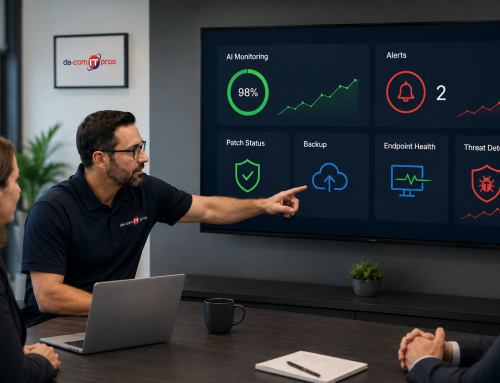
Beyond immediate problem-solving, proactive monitoring provides a wealth of data that can be used for strategic planning. Comprehensive dashboards and reports offer a bird’s-eye view of your entire IT infrastructure. This allows IT leaders and business managers to move beyond anecdotal evidence and make data-driven decisions.
With this information, you can answer important questions like:
- Which applications are causing the most issues for our users?
- Are there recurring network problems in a specific geographic region where we have multiple remote employees?
- What is the overall health and security posture of our entire device fleet?
This level of insight is invaluable for budgeting, resource allocation, and long-term IT strategy. It allows you to invest your IT dollars where they will have the most impact, whether that’s upgrading specific infrastructure, providing additional training on a particular application, or replacing an entire class of aging devices.
Empower Your Distributed Workforce in St. Louis and Beyond
The transition to remote and hybrid work is not a temporary trend; it’s a fundamental change in how we operate. Supporting this new reality requires a modern approach to IT management—one that is built on foresight, not reaction. By embracing proactive monitoring, you provide your team with the stable, secure, and efficient technological foundation they need to succeed, regardless of their location.
Don’t wait for technology issues to disrupt your business.
Ready to strengthen your business with proactive IT monitoring? Contact us today to see how we can keep your systems secure, reliable, and running smoothly. We proudly support businesses across St. Louis and Columbia, Missouri, as well as western Illinois.

Leave A Comment