
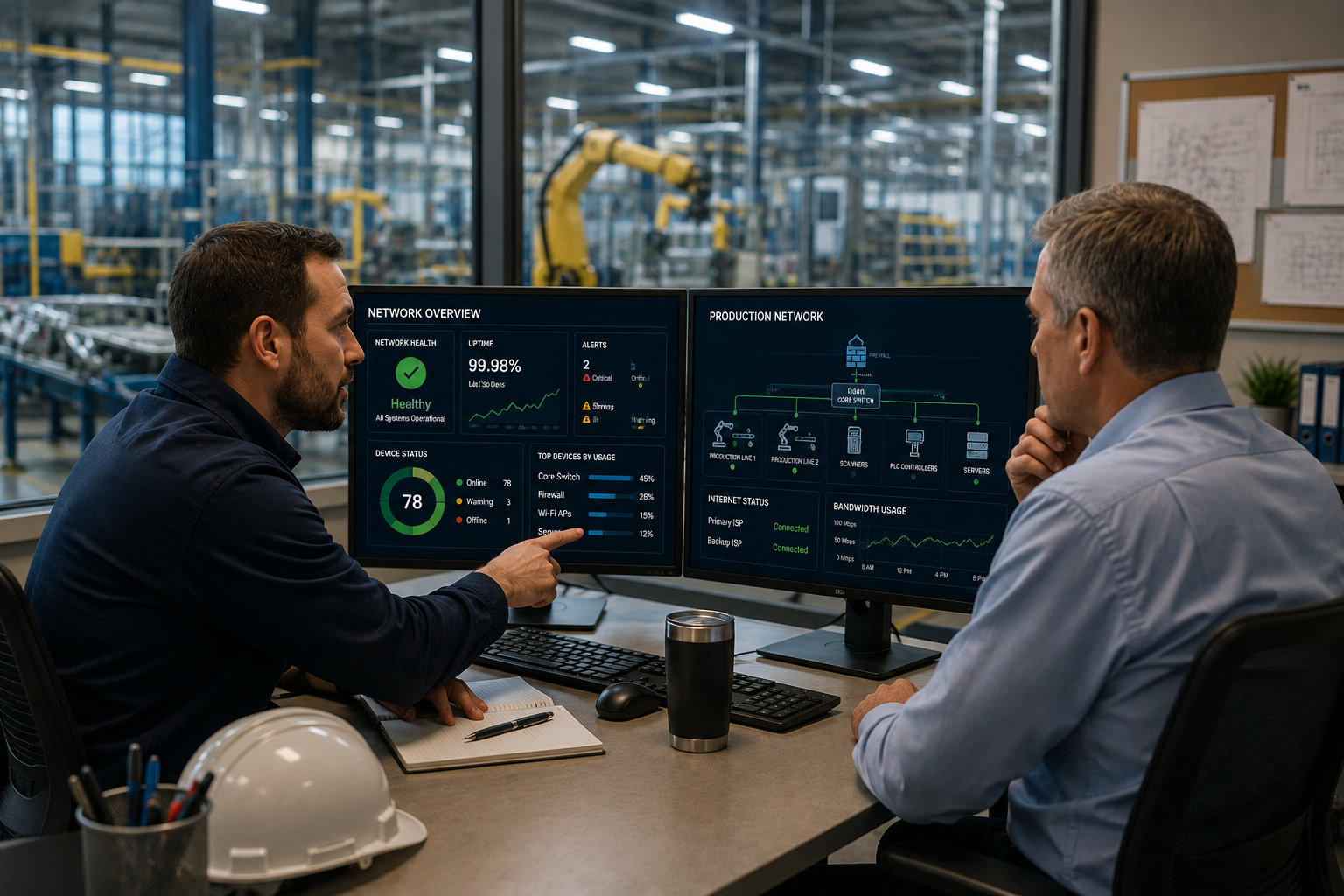
IT Support for Manufacturing Companies: Better Uptime
IT support for manufacturing companies needs to work differently than generic office IT. Manufacturing businesses depend on more than email, laptops, printers, and shared drives. They also depend on production schedules, connected equipment, inventory systems, ERP platforms, shipping workflows, quality documentation, vendor portals, time-sensitive orders, and production data that must keep moving.
When technology slows down in a traditional office, employees may be frustrated. When technology slows down in a manufacturing environment, the impact can reach production, shipping, customer commitments, labor costs, compliance, and revenue. A network issue is not always just a network issue. A failed update is not always just a failed update. A backup gap is not always just an IT problem. In manufacturing, small technology problems can become operational problems fast.
That is why manufacturers need an IT partner who understands the difference between supporting office users and supporting a production environment. A strong provider should know how to protect uptime, support production-adjacent networks, coordinate maintenance around schedules, secure legacy systems, plan for backup and recovery, and communicate clearly with both leadership and operations teams.
This guide explains what makes manufacturing IT different, what IT support for manufacturing companies should include, what questions to ask before choosing a provider, and how manufacturers in St. Louis, St. Charles, Chesterfield, Clayton, the Metro East, Belleville, Edwardsville, Collinsville, and Southern Illinois can reduce downtime risk with better technology support.
Quick Answer: What Is IT Support for Manufacturing Companies?
IT support for manufacturing companies is technology support designed around the systems, users, networks, equipment, and workflows manufacturers rely on to keep operations moving. It includes traditional IT support, such as help desk, cybersecurity, Microsoft 365, device management, and backups, but it also considers production floor dependencies, connected equipment, operational technology, specialized software, legacy systems, ERP platforms, inventory workflows, and uptime requirements.
Good manufacturing IT support may include:
- Help desk support for office and operations teams.
- Network monitoring and management.
- Cybersecurity protection and planning.
- Firewall and endpoint security management.
- Support for production-adjacent networks.
- Backup and disaster recovery planning.
- Planned maintenance windows around production schedules.
- Vendor coordination for ERP, equipment, software, and internet providers.
- Wi-Fi and connectivity support across office, warehouse, and production areas.
- Cloud, Microsoft 365, and identity management.
- Documentation of systems, devices, and dependencies.
- Strategic planning for growth, compliance, and risk reduction.
Da-Com IT Pros provides Managed IT Services for businesses that need proactive technology support, cybersecurity, network management, backup planning, help desk support, and long-term IT strategy.
Why Manufacturing Has Different IT Needs
Manufacturing environments are different from typical office environments because technology often touches both administrative work and production operations. The same network may support accounting, email, scheduling, inventory, shipping, quality control, production reporting, warehouse devices, and connected equipment. If that network is unstable, the effect can spread across departments.
A few things make manufacturing IT support more complex:
- Production systems often depend on reliable connectivity.
- Downtime can affect orders, labor, shipments, and customer commitments.
- Legacy equipment may need to coexist with modern systems.
- Operational technology may have different security and uptime requirements than office IT.
- Maintenance windows must respect production schedules.
- Cybersecurity risks can affect both business data and operations.
- Specialized software may require vendor coordination.
- Manufacturing teams often need support across office, warehouse, and production spaces.
The National Institute of Standards and Technology describes operational technology, or OT, as programmable systems and devices that interact with the physical environment or manage devices that interact with the physical environment. NIST’s OT security guidance specifically addresses the need to secure these systems while accounting for their performance, reliability, and safety requirements. You can review the resource here: NIST SP 800-82 Rev. 3, Guide to Operational Technology Security.
Not every manufacturer has the same OT environment, but the principle is important. Manufacturing technology is not only about convenience. It often supports real-world operations.
Generic IT Support Often Misses Production Reality
Generic IT support may work well for basic office needs, but manufacturing environments require more context. A provider that only thinks in terms of laptops, inboxes, and printers may not understand what happens when a production-related system is affected.
For example, a generic provider might see a software update as routine. A manufacturing-aware provider asks whether that update could affect production software, a workstation tied to equipment, a scanner used in shipping, a time clock, a warehouse device, or a reporting system used by operations.
Generic IT support may miss questions such as:
- What systems are production-critical?
- Which devices cannot be restarted during a shift?
- Which software platforms connect to inventory, shipping, or ERP?
- Which equipment depends on the network?
- Which systems are older but still operationally necessary?
- Which users need support outside normal office hours?
- What happens if the internet goes down during production?
- How are backups tested for production-related data?
- Who needs to approve maintenance windows?
Those questions matter because the wrong change at the wrong time can create real disruption. A good manufacturing IT partner should ask more questions before making changes, not fewer.
Production Floor Dependencies Change the Support Model
Manufacturing teams may use connected systems across the production floor, warehouse, shipping area, quality department, and front office. Even when equipment is not directly managed by the IT provider, it may still depend on the network, internet connection, firewall, workstation, server, or software environment.
Production floor dependencies may include:
- Barcode scanners.
- Shipping stations.
- Inventory devices.
- Work order systems.
- ERP connections.
- Quality control software.
- Label printers.
- Time clocks.
- Shop floor workstations.
- Wireless access points.
- Connected machinery interfaces.
- Vendor-managed equipment.
This does not mean your IT provider needs to repair every machine on the floor. It does mean your IT provider should understand how technology connects across the environment. If a label printer stops communicating, the issue may affect shipping. If Wi-Fi is weak in one area, barcode scanning may slow down. If a workstation tied to a specialized system fails, production reporting may stop. If an internet connection drops, cloud-based ERP access may be interrupted.
IT support for manufacturing companies should focus on both technical fixes and operational impact.
Legacy Systems and Modern Tools Need Careful Planning
Many manufacturers run a mix of older systems and newer tools. That is normal. A manufacturer may have older equipment that still works well, specialized software that cannot be easily replaced, a legacy server, a modern ERP platform, Microsoft 365, cloud storage, warehouse devices, and newer cybersecurity tools all operating at the same time.
The challenge is supporting that mix safely and reliably.
Legacy systems may create issues such as:
- Older operating systems.
- Limited patching options.
- Vendor restrictions.
- Compatibility problems.
- Security limitations.
- Unsupported software.
- Hardware that cannot be easily replaced.
- Specialized configurations that only a few people understand.
A manufacturing-aware IT provider should not rush changes without understanding these dependencies. Instead, they should document the environment, identify risk, coordinate with vendors, create backup plans, and recommend practical steps to reduce exposure over time.
This is especially important for cybersecurity. CISA’s Cross-Sector Cybersecurity Performance Goals are designed as voluntary practices that help organizations, including small and medium-sized organizations, prioritize high-impact actions to reduce cybersecurity risk. You can review the resource here: CISA Cybersecurity Performance Goals.
Manufacturing Downtime Costs More Than Office Downtime
Every business dislikes downtime, but downtime in manufacturing can be especially expensive. A technology issue can affect more than one employee. It can affect a shift, a line, a shipment, or a customer deadline.
Manufacturing downtime can lead to:
- Idle labor.
- Missed shipments.
- Delayed orders.
- Production rescheduling.
- Customer frustration.
- Overtime costs.
- Lost production data.
- Quality documentation delays.
- Shipping and receiving problems.
- Contract or service-level pressure.
This is why response time and planning matter. A provider that treats every issue like a normal office ticket may not understand the urgency. If a production-related system is down, the support response should reflect the business impact.
Da-Com’s guide to backup and continuity planning explains why businesses need recovery strategies that account for downtime, data loss, system availability, and operational disruption before an issue occurs.
What Good IT Support for Manufacturing Companies Includes
Strong IT support for manufacturing companies should be proactive, practical, and aligned with how the business actually operates. It should not feel like a generic help desk package copied from a typical office environment.
Proactive Monitoring
Manufacturers need visibility into systems before problems interrupt operations. Proactive monitoring can help identify network issues, device failures, storage problems, backup failures, unusual activity, and connectivity concerns before employees discover them the hard way.
Monitoring may include:
- Servers.
- Firewalls.
- Switches.
- Wireless access points.
- Backup systems.
- Endpoints.
- Security alerts.
- Internet connectivity.
- Critical office systems.
Maintenance Windows That Respect Production
Updates and maintenance are necessary, but timing matters. Manufacturing businesses may run multiple shifts, tight schedules, weekend work, or seasonal production cycles. A routine update at the wrong time can create avoidable disruption.
A good IT provider should coordinate maintenance windows around production realities, communicate upcoming changes, and avoid pushing updates without understanding the operational impact.
Backup and Recovery Planning for Production Data
Backup planning should include more than office files. Manufacturers need to think about ERP data, inventory records, quality documentation, production reports, shipping files, customer records, and any other information needed to keep operations moving.
Backup planning should answer:
- What data is being backed up?
- How often are backups running?
- How long would recovery take?
- Has recovery been tested?
- Which systems are most critical?
- What happens if a server, application, or cloud platform is unavailable?
Network Support Across Office, Warehouse, and Production Areas
Manufacturing networks often extend beyond desks. Wi-Fi may need to reach warehouse aisles, production spaces, shipping stations, meeting rooms, offices, and visitor areas. Switches, firewalls, routers, and access points need to be documented and maintained.
Da-Com’s guide to managed network services explains how proactive network monitoring, firewall management, Wi-Fi support, internet failover planning, and reporting can help businesses reduce surprise outages and improve connectivity.
Cybersecurity Built Around Manufacturing Risk
Manufacturers are attractive targets because downtime is costly, supply chains are connected, and many operations depend on a mix of systems. Cybersecurity support should include more than antivirus software.
Manufacturing cybersecurity may include:
- Endpoint protection.
- Email security.
- Multi-factor authentication.
- Firewall management.
- Backup alignment.
- Security awareness training.
- Remote access controls.
- Vendor access review.
- Incident response planning.
- Network segmentation discussions.
Da-Com’s cybersecurity services can help businesses evaluate risk, strengthen protection, improve monitoring, and create a more practical security plan.
Manufacturing IT Support and Operational Technology
Operational technology and information technology often overlap in manufacturing. IT may support the business network, endpoints, cloud systems, and cybersecurity tools. OT may include systems that monitor or control physical processes, equipment, or production activity. Even when these areas are managed separately, they often depend on shared planning and communication.
NIST’s OT security guidance explains that OT systems have unique performance, reliability, and safety requirements. That is why manufacturing IT decisions should not be made in isolation from operations.
Good IT support should help manufacturers think through:
- Which systems belong to IT, OT, or both.
- Who is responsible for each system.
- How vendor access is controlled.
- How remote support is secured.
- How production systems are documented.
- How changes are approved.
- How backups and recovery plans are tested.
- How security policies affect operations.
The goal is not to overcomplicate the environment. The goal is to avoid surprises.
Cybersecurity Questions Manufacturers Should Be Asking
Manufacturers should ask practical cybersecurity questions that connect security to operations. The best questions are not only technical. They are operational.
Ask:
- Who has remote access to our systems?
- Are vendor accounts reviewed regularly?
- Do employees use multi-factor authentication?
- Are backups protected from ransomware?
- Are critical systems documented?
- Can we recover production-related data quickly?
- Are old systems isolated or protected?
- Do we have an incident response plan?
- Do employees know how to report suspicious emails?
- Are firewall rules reviewed?
- Are security tools monitored?
CISA provides cybersecurity guidance for critical infrastructure and organizations working to reduce risk. Manufacturers can use resources like the Cybersecurity Performance Goals to prioritize practical improvements instead of trying to do everything at once.
IT Support for Manufacturing Companies by Business Need
Small Manufacturers Without Internal IT
Small manufacturers often rely on an office manager, operations leader, or outside vendor to handle technology problems. That may work for simple issues, but it can create risk as the business grows. Managed IT support can give small manufacturers access to a broader technical team without hiring a full internal department.
Mid-Sized Manufacturers With Growing Complexity
Mid-sized manufacturers may have more systems, more users, more equipment, and more vendor relationships. They may need help with network documentation, cybersecurity, backup planning, remote access, Wi-Fi coverage, and help desk support.
Manufacturers With Internal IT Teams
Some manufacturers already have internal IT staff but still need outside support. A managed IT provider can help with monitoring, cybersecurity tools, backup strategy, project support, documentation, or after-hours coverage.
Manufacturers With Compliance or Customer Requirements
Some manufacturers have customer, supply chain, insurance, or industry requirements related to cybersecurity, data protection, access control, or documentation. A strong IT partner can help organize the technology side of those requirements and support conversations with leadership, vendors, and auditors.
The Real Cost of Getting Manufacturing IT Wrong
The most expensive IT mistakes in manufacturing are not always dramatic. They may look small at first.
Examples include:
- A patch applied during production hours.
- A firewall change that disrupts a vendor connection.
- A backup that was running but never tested.
- A Wi-Fi dead zone in a warehouse aisle.
- A legacy system that no one documented.
- A production workstation without proper protection.
- A support ticket that sits too long because urgency was misunderstood.
- An internet outage with no failover plan.
- A phishing email that reaches an employee with access to critical systems.
These issues may not look serious until the line stops, shipments are delayed, or leadership realizes the recovery plan was incomplete.
Good IT support for manufacturing companies is designed to reduce that risk. It creates visibility, documentation, communication, response planning, and a better understanding of how technology supports operations.
What to Ask an IT Provider Before You Sign
If you are evaluating IT support options, ask questions that separate generic office IT providers from manufacturing-aware partners.
- Have you supported manufacturing companies before?
- How do you handle maintenance windows around production schedules?
- How do you prioritize production-related issues?
- Do you support both office networks and production-adjacent networks?
- How do you document legacy systems and vendor dependencies?
- How do you coordinate with ERP, equipment, and software vendors?
- How do you handle cybersecurity for manufacturers?
- How do you secure remote access for vendors and employees?
- How do you test backups and recovery plans?
- How do you support multiple shifts or after-hours issues?
- Can you help improve Wi-Fi coverage in warehouse or production areas?
- How do you communicate technical issues to operations leaders?
- What reporting will we receive?
- How often do you review our IT strategy?
If the answers feel vague, that is worth noting. A manufacturing IT provider should be able to talk about downtime, production impact, cybersecurity, maintenance timing, vendor coordination, and recovery planning in practical terms.
Signs Your Manufacturing Business Needs Better IT Support
Your manufacturing business may need stronger IT support if you notice:
- Recurring Wi-Fi or network issues.
- Employees rebooting equipment as the default fix.
- Unclear ownership of production-related systems.
- Old equipment with no documented replacement plan.
- Backups that are not regularly tested.
- Security recommendations that feel generic.
- Maintenance happening at inconvenient times.
- Support tickets that do not reflect operational urgency.
- No clear plan for ransomware, outages, or vendor access issues.
- Leadership unsure what systems are most critical.
- Production data not included in backup planning.
- Internet outages disrupting work more often than they should.
These signs do not always mean something is about to fail. They do mean the business may lack visibility and control over its technology environment.
How Da-Com Helps Manufacturers Think Beyond Generic IT
Manufacturing IT support should be practical, proactive, and built around how the business works. Da-Com IT Pros helps local organizations think through technology as part of the bigger operational picture, not just as a list of devices.
That may include:
- Managed IT support.
- Network monitoring and management.
- Cybersecurity planning.
- Backup and continuity planning.
- Help desk support.
- Microsoft 365 support.
- Wi-Fi and connectivity support.
- Vendor coordination.
- Endpoint management.
- Strategic technology planning.
Da-Com also supports the broader office technology ecosystem, including Managed Print Services, office equipment, document workflows, and business technology support. That matters for manufacturers because printers, scanners, copiers, networks, cybersecurity, and document processes often overlap in daily operations.
Frequently Asked Questions About IT Support for Manufacturing Companies
What makes IT support for manufacturing companies different?
IT support for manufacturing companies must account for production schedules, connected equipment, legacy systems, ERP platforms, warehouse networks, cybersecurity risk, production data, and the higher cost of downtime. It is broader than basic office IT support.
Do manufacturers need managed IT services?
Many manufacturers benefit from managed IT services because they need proactive monitoring, cybersecurity, backup planning, help desk support, network management, and vendor coordination without hiring a large internal IT team.
What is manufacturing cybersecurity?
Manufacturing cybersecurity focuses on protecting the systems, users, networks, data, and production-adjacent technology manufacturers rely on. It may include endpoint protection, email security, MFA, firewall management, backup protection, vendor access controls, and incident response planning.
Why is downtime more expensive for manufacturers?
Downtime can affect production, labor, shipping, customer commitments, quality documentation, inventory systems, and revenue. A technology issue can quickly become an operational issue.
How should manufacturers handle maintenance windows?
Maintenance should be scheduled around production needs whenever possible. Updates, patches, and system changes should be planned, communicated, and approved so they do not interrupt critical operations.
Can an MSP support production floor technology?
An MSP may not directly service manufacturing machinery, but it can support the networks, workstations, servers, security tools, backups, vendor access, and connected systems that production floor technology may depend on.
What should manufacturers ask an IT provider?
Manufacturers should ask about experience with manufacturing clients, production schedules, after-hours support, backup testing, cybersecurity, vendor coordination, network monitoring, legacy systems, and response processes for production-related issues.
Does manufacturing IT support include OT security?
It can include coordination around OT security, especially when operational technology connects to business networks, remote access tools, vendors, or data systems. Manufacturers should clarify responsibilities between IT, OT, vendors, and internal operations teams.
The Bottom Line: Manufacturing Needs IT Support Built Around Operations
IT support for manufacturing companies should not be a generic office IT package. Manufacturers need technology support that understands uptime, production schedules, connected systems, legacy equipment, cybersecurity, backup planning, and the real cost of downtime.
The right provider should ask better questions, document the environment, coordinate changes carefully, communicate clearly, and help leadership understand where technology risk could affect operations.
For manufacturers, IT is not just about keeping computers working. It is about keeping the business moving.
To learn more about IT support for manufacturing companies in St. Louis, St. Charles, Chesterfield, Clayton, the Metro East, Belleville, Edwardsville, Collinsville, or Southern Illinois, contact Da-Com today. Da-Com IT Pros can help you evaluate your current technology environment, identify gaps, strengthen cybersecurity, improve network reliability, plan for backup and recovery, and build IT support around the way your manufacturing operation actually works.



Leave A Comment