
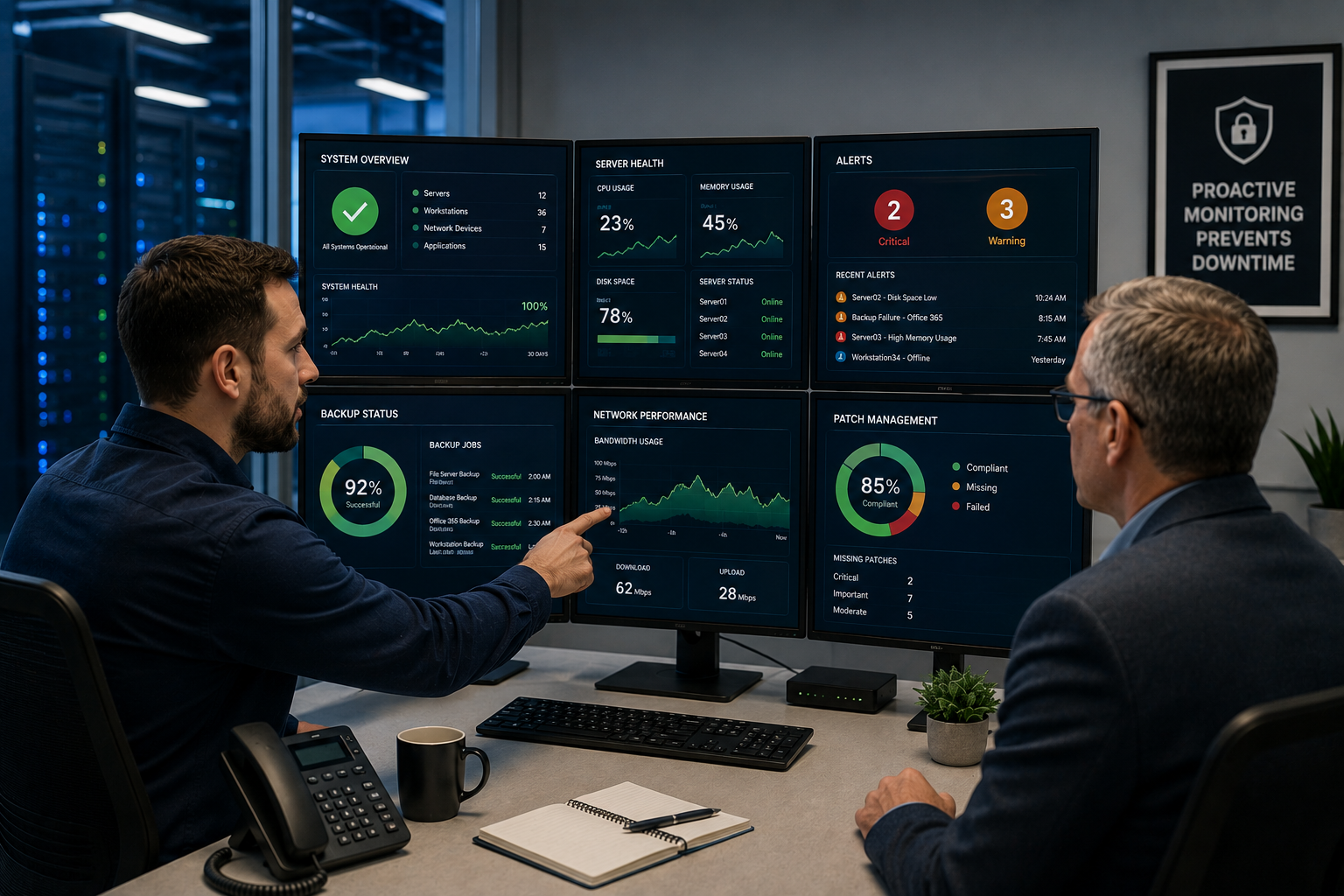
Proactive IT Monitoring: Stop Downtime Early
Proactive IT monitoring helps businesses catch technology warning signs before they become downtime, security issues, failed backups, or emergency repair calls. Most IT problems do not appear out of nowhere. A server may run low on storage for weeks. A backup job may fail quietly overnight. A firewall may need an update. A hard drive may show early signs of failure. A network may slow down little by little until employees start complaining.
By the time a system actually fails, the warning signs were often there already. The problem is that no one was watching for them.
That is the entire purpose of proactive IT monitoring. Instead of waiting until someone cannot log in, cannot access files, cannot print, cannot open an application, or cannot reach the internet, monitoring tools and IT professionals watch for early indicators that something needs attention.
For businesses in St. Louis, St. Charles, Chesterfield, Clayton, the Metro East, Belleville, Edwardsville, Collinsville, and Southern Illinois, proactive IT monitoring can help reduce surprise outages, improve cybersecurity visibility, verify backups, protect productivity, and make technology easier to manage.
This guide explains what proactive IT monitoring is, what gets monitored, how it differs from reactive IT support, why it matters for small and midsize businesses, and what to ask before choosing a monitoring provider.
Quick Answer: What Is Proactive IT Monitoring?
Proactive IT monitoring is the process of continuously watching business technology systems for early warning signs, performance problems, security risks, backup failures, hardware issues, and network concerns before they disrupt employees. It is a core part of modern managed IT services because it shifts IT support from “wait until something breaks” to “catch problems before they become outages.”
Proactive IT monitoring may include:
- Server health monitoring.
- Disk space and storage monitoring.
- Memory and CPU usage tracking.
- Network performance monitoring.
- Firewall and security alert monitoring.
- Backup completion monitoring.
- Patch and update monitoring.
- Endpoint health monitoring.
- Application and system error monitoring.
- Internet connectivity monitoring.
- Device uptime monitoring.
- Reporting and alerting.
The goal is not to eliminate every possible IT issue. Hardware can still fail. Internet providers can still have outages. Users can still run into problems. But proactive monitoring improves the odds that many issues are noticed early, addressed faster, and handled before they interrupt the workday.
Da-Com IT Pros provides Managed IT Services for businesses that need proactive monitoring, cybersecurity, network management, backup planning, help desk support, and long-term IT strategy.
Reactive IT Support vs. Proactive IT Monitoring
Reactive IT support waits for something to break, then responds. It is the model many small businesses default to without realizing it. A slow computer gets attention after an employee complains. A server issue gets noticed after an application stops working. A failed backup is discovered when someone needs to restore a file. A patching problem becomes urgent after a vulnerability is exploited.
Proactive IT monitoring flips that timeline. Systems are watched continuously for early indicators, such as unusual resource usage, failed backup jobs, overdue security updates, hardware degradation, network traffic spikes, or recurring errors. The goal is to take action before the issue affects employees.
| Category | Reactive IT Support | Proactive IT Monitoring |
|---|---|---|
| Timing | After something breaks | Before or as warning signs appear |
| Main trigger | User complaint or outage | Alert, trend, threshold, or monitoring event |
| Cost impact | Often higher because issues are urgent | Often lower because fixes can be planned |
| Employee impact | Work is already disrupted | Many issues are handled before users notice |
| Backup visibility | Failures may be discovered too late | Failures can be flagged and addressed |
| Cybersecurity value | Risks may remain hidden | Alerts and vulnerabilities are watched more closely |
| Business experience | Firefighting and frustration | More visibility and fewer surprises |
The difference matters because technology downtime is rarely just a technical problem. It affects employees, customers, deadlines, revenue, confidence, and leadership time.
Why Proactive IT Monitoring Matters More Than It Seems
The cost of IT downtime rarely appears as one clean line item on a budget. It is usually scattered across lost productivity, delayed customer work, emergency repair fees, overtime, missed deadlines, employee frustration, and the quieter cost of people losing confidence in the systems they rely on every day.
When technology is unreliable, employees build workarounds. They email files to personal accounts. They avoid certain systems. They wait until later to complete tasks. They stop reporting small issues because they assume nothing will change. Over time, small technology frustrations can become a normal part of the workday.
Proactive IT monitoring helps prevent that pattern by creating visibility. Instead of relying only on employees to report issues, the IT provider can see problems developing in the environment.
Proactive monitoring helps businesses:
- Reduce surprise downtime.
- Catch low disk space before servers fail.
- Verify that backups completed successfully.
- Identify network performance problems.
- Spot hardware degradation.
- Find systems missing patches or updates.
- Track security alerts.
- Respond faster when something changes.
- Plan maintenance instead of reacting to emergencies.
- Improve leadership visibility into IT health.
Proactive monitoring does not make technology perfect. It makes problems less invisible.
What Gets Monitored in a Proactive IT Monitoring Setup?
A strong proactive IT monitoring setup should watch the systems that matter most to business operations. The exact scope depends on your environment, but most businesses need monitoring across servers, endpoints, networks, backups, security tools, and critical applications.
Server and Hardware Health
Servers and core hardware often show warning signs before failure. Monitoring can help identify performance changes, capacity problems, and hardware alerts before they disrupt users.
Server and hardware monitoring may include:
- Disk space usage.
- Memory usage.
- CPU performance.
- Temperature alerts.
- Hard drive health.
- Power supply alerts.
- Event logs.
- Uptime and availability.
- Storage trends.
If a server is running out of disk space, it is much better to know before files stop saving, applications slow down, or employees lose access.
Backup Monitoring
Backups are only useful if they actually complete and can be restored. One of the biggest risks in business technology is assuming backups are working without verifying them.
Backup monitoring may include:
- Backup job completion.
- Backup failure alerts.
- Backup storage capacity.
- Missed backup schedules.
- Recovery point tracking.
- Restore testing reminders.
- Backup system health.
Da-Com’s guide to backup and continuity planning explains why businesses need recovery strategies that account for downtime, data loss, system availability, and operational disruption before an issue occurs.
Security Patches and Updates
Security updates are a key part of reducing risk. If systems fall behind, vulnerabilities may remain open longer than they should.
The Federal Trade Commission recommends that businesses set a schedule for updating programs, apps, web browsers, and operating systems, turn on automatic updates where possible, and back up important files regularly. You can review the FTC resource here: FTC Cybersecurity for Small Business.
Patch and update monitoring may include:
- Operating system updates.
- Security patch status.
- Endpoint update compliance.
- Server update status.
- Third-party software update visibility.
- Restart requirements.
- Failed patch alerts.
Updates should also be managed thoughtfully. Some businesses need maintenance windows to avoid disrupting work, production, patient care, customer service, or after-hours operations.
Network Performance
The network connects employees to the systems they use every day. If the network slows down, everything can feel broken, even when the applications themselves are fine.
Network monitoring may include:
- Bandwidth usage.
- Firewall health.
- Switch and router status.
- Internet connectivity.
- Latency and packet loss.
- Unusual traffic patterns.
- Wireless access point health.
- VPN or remote access performance.
Da-Com’s guide to managed network services explains how network monitoring, firewall management, Wi-Fi support, internet failover planning, and reporting can help businesses reduce surprise outages and improve visibility.
Application and System Errors
Applications and operating systems often produce errors before users notice a major issue. Monitoring can help identify repeated errors, service failures, or unusual system behavior.
Error monitoring may include:
- Application failures.
- Windows service issues.
- Repeated login errors.
- Database alerts.
- System log patterns.
- Performance bottlenecks.
- Recurring crash reports.
One error may not mean much. A pattern of errors can be an early warning sign that something needs attention.
Proactive IT Monitoring and Cybersecurity
Proactive IT monitoring is not the same as full cybersecurity protection, but it supports cybersecurity by improving visibility. Many security issues start as signals: unusual activity, failed login attempts, missing patches, endpoint alerts, backup failures, suspicious network traffic, or disabled services.
The National Institute of Standards and Technology Cybersecurity Framework helps organizations better understand and improve how they manage cybersecurity risk. You can review the framework here: NIST Cybersecurity Framework.
Proactive monitoring can support cybersecurity by helping identify:
- Missing patches.
- Security tool alerts.
- Endpoint issues.
- Firewall events.
- Backup failures.
- Unusual network traffic.
- Unauthorized access attempts.
- Devices that go offline unexpectedly.
- Systems with outdated protection.
Da-Com’s cybersecurity services can help businesses evaluate risk, strengthen protection, improve monitoring, and create a more practical security plan.
Proactive Monitoring and Backup Confidence
Backup monitoring deserves special attention because backups are often ignored until a crisis. A business may assume files, servers, cloud data, or critical systems are protected because backups were set up at some point. But scheduled does not always mean successful.
A backup can fail because of:
- Storage capacity issues.
- Connection problems.
- Credential changes.
- Software errors.
- Corrupted jobs.
- Missed schedules.
- Configuration changes.
- Hardware problems.
Proactive IT monitoring helps flag backup problems early so they can be corrected before a restore is needed. That matters because the worst time to discover a backup failure is after ransomware, accidental deletion, hardware failure, or a system outage.
CISA provides cyber guidance for small businesses that includes practical security steps and risk reduction resources. You can review the resource here: CISA Cyber Guidance for Small Businesses.
How Proactive IT Monitoring Reduces Emergency IT Work
Emergency IT work is expensive in more ways than one. There may be after-hours service costs, but there is also the disruption of pulling employees, managers, and leadership into a crisis. People stop doing their normal work to troubleshoot, wait, communicate, or create manual workarounds.
Proactive IT monitoring helps move more work into planned maintenance instead of emergency firefighting.
For example:
- Low disk space can be addressed before an application stops working.
- A failed backup can be corrected before data needs to be restored.
- An aging device can be replaced before it fails.
- A slow network trend can be investigated before users lose confidence.
- A patching gap can be closed before it becomes a security exposure.
- A recurring application error can be reviewed before it becomes a major outage.
This shift matters because planned work is usually calmer, easier to schedule, easier to communicate, and less disruptive than emergency repairs.
Proactive IT Monitoring for Small and Midsize Businesses
Small and midsize businesses often benefit from proactive IT monitoring because they do not always have full internal IT teams watching systems around the clock. In many organizations, technology ownership is split between an office manager, operations leader, internal power user, outside vendor, or part-time support resource.
That can work for simple environments, but it becomes risky as the business grows.
Proactive monitoring is especially useful when a business relies on:
- Cloud applications.
- Microsoft 365.
- VoIP phones.
- Remote or hybrid workers.
- Customer-facing systems.
- Shared files.
- Production systems.
- Medical, legal, financial, or operational records.
- Networked printers and scanners.
- Backups and disaster recovery tools.
- Specialized software.
When these systems matter to daily operations, waiting for them to fail is not a good strategy.
Industries That Benefit From Proactive IT Monitoring
Healthcare and Dental Offices
Healthcare and dental offices need dependable access to scheduling systems, patient information, imaging tools, forms, phones, and billing systems. Proactive monitoring helps reduce interruptions that can affect staff productivity and patient flow.
Manufacturing and Distribution
Manufacturers and distributors rely on networks, ERP systems, inventory tools, shipping stations, warehouse devices, and production-adjacent systems. Proactive monitoring helps identify issues before they affect operations.
Professional Services
Law firms, accounting firms, insurance offices, financial firms, and consulting businesses rely on secure access to documents, email, phones, client files, and cloud platforms. Monitoring helps reduce downtime and improve confidence in core systems.
Schools and Nonprofits
Schools and nonprofits often need stable technology without large internal IT teams. Proactive monitoring helps provide visibility, reduce surprises, and support staff who already wear many hats.
Local Government and Community Organizations
Local government offices and community organizations depend on reliable document systems, communication tools, public service workflows, and secure access. Proactive monitoring helps keep critical services moving.
What to Look for in a Proactive IT Monitoring Setup
Not every provider means the same thing when they say they offer monitoring. Some tools collect data but do not create action. Some alerts are ignored. Some providers only check systems during business hours. Some monitoring setups are too narrow to catch the issues that matter most.
Before choosing a provider, ask:
- Is monitoring continuous or occasional?
- What systems are monitored?
- Are servers, endpoints, networks, firewalls, and backups included?
- What happens when an alert is triggered?
- Who reviews alerts?
- How are urgent alerts escalated?
- Are backup jobs verified?
- Are failed patches or updates tracked?
- Do you monitor hardware health and disk space?
- Do you provide reports?
- How do you communicate recurring problems?
- How do you turn alerts into action?
- What is monitored after hours?
- How does monitoring connect with cybersecurity?
- How does monitoring connect with backup and continuity planning?
The most important question is simple: what happens after the alert?
Monitoring without action is just noise. A strong provider should have a clear process for reviewing, prioritizing, escalating, resolving, and reporting on monitoring alerts.
Signs Your Current IT Support Is Too Reactive
Your business may be relying on reactive IT support if:
- Employees are usually the first people to notice problems.
- Slow computers are addressed only after complaints.
- Backups are assumed to work but not regularly verified.
- Patch status is unclear.
- Network problems keep returning.
- Servers or devices run low on storage without warning.
- There is no regular reporting on system health.
- Recurring issues are fixed temporarily but never investigated.
- IT emergencies feel normal.
- You do not know what is being monitored.
If the honest answer is “we are not sure,” that is usually a sign the monitoring setup needs a closer look.
Proactive IT Monitoring and Managed IT Services
Proactive monitoring works best as part of a broader managed IT services plan. Monitoring can identify warning signs, but the provider also needs the tools, access, process, and expertise to respond.
A complete managed IT approach may include:
- Proactive monitoring.
- Help desk support.
- Endpoint management.
- Patch management.
- Cybersecurity tools.
- Backup monitoring.
- Network management.
- Microsoft 365 support.
- Vendor coordination.
- Strategic IT planning.
- Regular reporting and business reviews.
Monitoring is one part of the bigger goal: making business technology more reliable, secure, visible, and easier to manage.
Common Mistakes Businesses Make With IT Monitoring
Assuming Monitoring Is Included
Some businesses assume their IT provider is monitoring everything. That may not be true. Ask exactly what is monitored and what is not.
Monitoring Without Acting
Alerts only matter if someone responds. A provider should have a defined process for triage, escalation, resolution, and follow-up.
Ignoring Backups
Backup monitoring should be part of any serious IT monitoring strategy. A backup that fails silently can create major risk.
Forgetting About the Network
Servers and computers matter, but the network connects everything. Firewalls, switches, routers, Wi-Fi, and internet connections should not be ignored.
Not Reviewing Reports
Monitoring data should help leadership understand patterns, risks, recurring issues, and investment priorities. If reports are never reviewed, insight is lost.
Frequently Asked Questions About Proactive IT Monitoring
What is proactive IT monitoring?
Proactive IT monitoring is the continuous watching of business technology systems for early warning signs, performance problems, failed backups, security issues, hardware problems, and network concerns before they disrupt employees.
How is proactive monitoring different from reactive IT support?
Reactive IT support waits for something to break and then responds. Proactive monitoring watches systems continuously so potential issues can be identified and addressed earlier.
What systems should be monitored?
Businesses often monitor servers, endpoints, firewalls, switches, routers, Wi-Fi access points, backups, security tools, applications, internet connections, and system performance.
Does proactive IT monitoring prevent every outage?
No. No monitoring setup can prevent every possible outage. However, proactive monitoring can reduce surprise failures, catch many warning signs earlier, and improve response time when issues appear.
Why is backup monitoring important?
Backup monitoring helps confirm that backups completed successfully. Without verification, a business may not discover a backup failure until it needs to restore data.
Can proactive monitoring improve cybersecurity?
Yes. Proactive monitoring can help identify missing patches, security alerts, unusual traffic, endpoint issues, firewall events, and backup failures that may affect cybersecurity risk.
Is proactive IT monitoring only for large companies?
No. Small and midsize businesses often benefit from proactive monitoring because they may not have internal IT staff watching systems continuously.
What should I ask an IT provider about monitoring?
Ask what systems are monitored, whether monitoring is continuous, how alerts are handled, whether backups are verified, how urgent issues are escalated, and what reports you will receive.
The Bottom Line: Proactive IT Monitoring Means Fewer Surprises
Proactive IT monitoring helps businesses move away from emergency firefighting and toward better visibility, better planning, and fewer surprises. It catches warning signs before they turn into downtime, verifies important systems like backups, supports cybersecurity, and helps employees stay productive.
The value is not only technical. It is operational. When systems are monitored, alerts are reviewed, and issues are handled early, the business can spend less time reacting to problems and more time doing the work that matters.
For many small and midsize businesses, proactive monitoring is one of the clearest differences between basic IT support and a true managed IT partner.
To learn more about proactive IT monitoring for your St. Louis, St. Charles, Chesterfield, Clayton, Metro East, Belleville, Edwardsville, Collinsville, or Southern Illinois business, contact Da-Com today. Da-Com IT Pros can help you evaluate what is being monitored, what may be slipping through, and how proactive IT support can help reduce downtime, strengthen cybersecurity, and keep your business moving.





Leave A Comment