
Managed IT Services St. Louis: How Local Support Makes Office Technology Easier
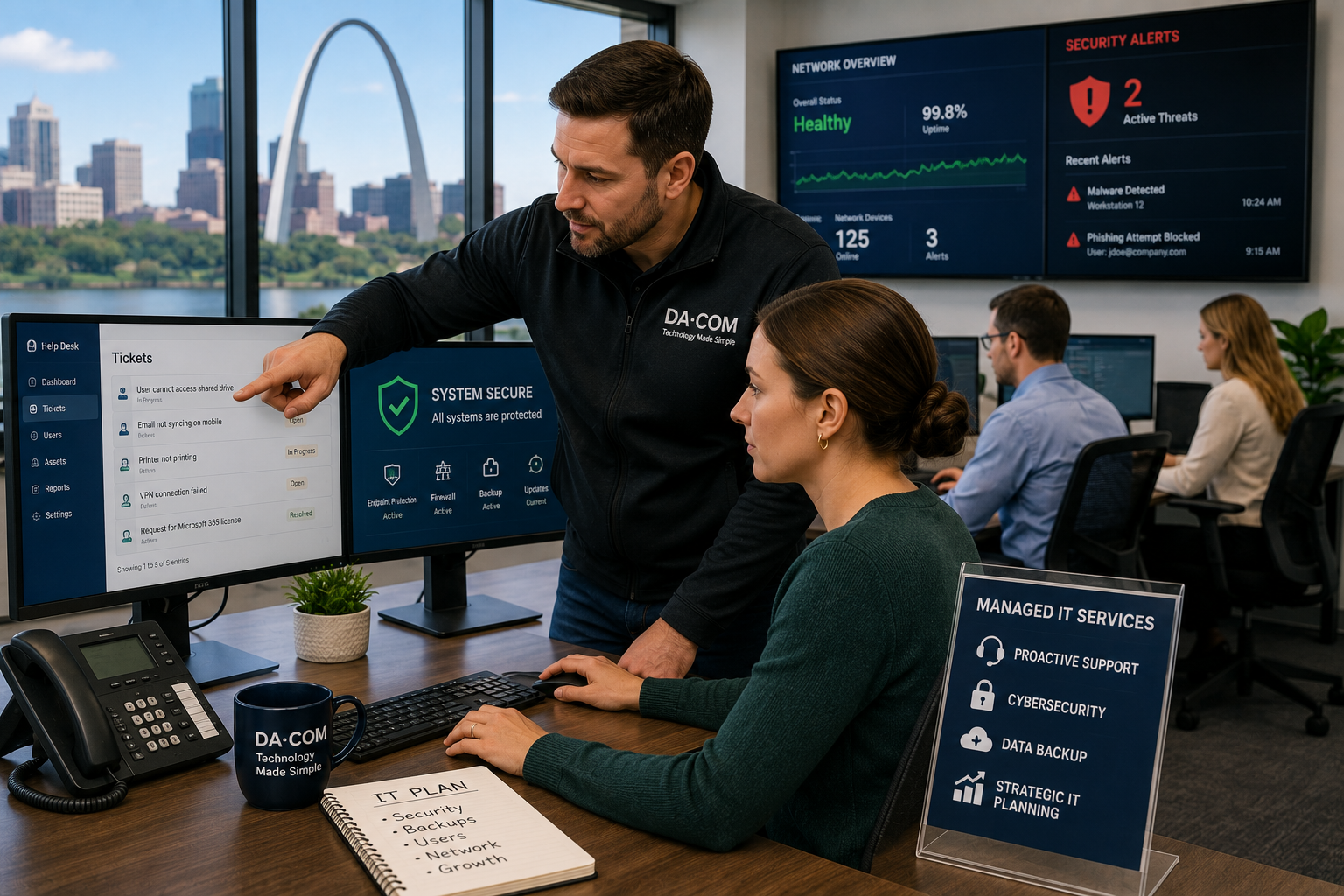
Managed IT Services St. Louis businesses rely on should do more than fix technology after something breaks. The right local managed service provider should help reduce downtime, improve cybersecurity, support employees, protect data, manage systems, and make day-to-day technology easier to understand.
Most businesses do not need more technology for the sake of technology. They need fewer technology problems.
When office technology is working, nobody thinks much about it. Employees log in. Files open. Emails send. Printers print. Applications load. Meetings start. Customers get responses. The day moves forward.
But when something breaks, everything changes.
A server issue stops employees from accessing files. A cybersecurity alert creates uncertainty. A network outage brings productivity to a halt. An employee cannot access a critical application. A Microsoft 365 issue delays communication. A backup question creates panic. A vendor ticket sits unanswered.
Suddenly, technology becomes everyone’s problem.
And usually, one person ends up carrying the burden: the office manager, operations director, controller, executive director, business owner, or internal IT employee everyone turns to when something goes wrong.
That is why more organizations across St. Louis, St. Charles, the Metro East, Columbia, Belleville, Edwardsville, Collinsville, and Southern Illinois are turning to Managed IT Services. They are not looking for another vendor. They are looking for fewer fires to put out, faster answers, stronger cybersecurity, and a local technology partner that understands how their business actually works.
Quick Answer: What Are Managed IT Services?
Managed IT Services allow businesses to outsource day-to-day technology management to a dedicated provider known as a Managed Service Provider, or MSP. Instead of waiting for something to break, an MSP proactively monitors, maintains, secures, and supports your technology environment.
Typical Managed IT Services include:
- Help desk support.
- Network monitoring.
- Cybersecurity protection.
- Data backup and recovery.
- Microsoft 365 management.
- Endpoint protection.
- Cloud services.
- Patch management.
- Compliance support.
- Vendor coordination.
- Strategic IT planning.
- Business continuity planning.
The goal is simple: keep employees productive while reducing technology headaches.
Da-Com’s managed IT support is designed to help businesses better maintain, secure, and leverage technology through proactive support, cybersecurity, backup, business continuity, and strategic planning.
Why Businesses Are Moving Away From Break-Fix IT
For years, many organizations relied on the break-fix IT model. Something broke. You called someone. They fixed it. You paid the bill. Then everyone waited for the next problem.
That approach may have worked when business technology was simpler. Today, most organizations depend on cloud applications, mobile devices, cybersecurity tools, remote access, wireless networks, file sharing, Microsoft 365, line-of-business software, printers, scanners, and connected office equipment.
The problem with break-fix support is simple: problems are expensive.
Downtime is expensive. Cybersecurity incidents are expensive. Lost productivity is expensive. Missed deadlines are expensive. Emergency support is expensive. The stress of not knowing who to call is expensive too.
Modern businesses need technology partners who help prevent problems before they interrupt operations. That shift is one reason Managed IT Services St. Louis businesses use continue to grow across small and midsize organizations.
A managed IT company does not wait for every issue to become an emergency. Instead, the provider monitors systems, maintains devices, applies updates, supports users, reviews security needs, and helps plan for technology changes before they create unnecessary disruption.
Why Local Managed IT Services St. Louis Businesses Use Feel Different
Not all MSPs operate the same way. Many national providers rely heavily on large ticket queues, offshore help desks, remote-only support, and standardized service processes. Those models may work for some organizations, but many local businesses prefer a provider that feels closer, more accountable, and easier to reach.
Local support feels different when something goes wrong.
When employees cannot work, every minute matters. A local MSP can often respond faster, dispatch on-site support when needed, and build stronger relationships with the people they support.
For businesses across St. Louis and Southern Illinois, local accountability matters because technology problems are rarely just technical. They affect customer service, internal workflows, revenue, employee morale, compliance, and leadership confidence.
Da-Com’s St. Louis business technology services page highlights secure, seamless, and cost-effective solutions designed to keep local businesses running smoothly.
The Benefits of Choosing a Local MSP in St. Louis
A local MSP can provide several advantages for organizations that want stronger support without building a large internal IT department.
Faster Response Times
When systems are down, employees are locked out, or a cybersecurity alert appears, response time matters. A local MSP can often begin troubleshooting quickly and send on-site support when remote help is not enough.
Fast support helps reduce downtime and gives business leaders more confidence that the issue is being handled.
You Know Who You Are Calling
Relationships matter. When your technology partner knows your employees, systems, workflows, goals, and common pain points, support becomes easier.
Your team spends less time explaining the same issue over and over. Problems can be solved faster because the MSP understands the environment.
Better Understanding of Local Business Needs
A local MSP often works with organizations similar to yours, including medical practices, law firms, manufacturers, schools, nonprofits, financial organizations, construction firms, local governments, and professional service businesses.
That local experience helps providers make practical recommendations instead of giving generic advice.
Stronger Accountability
When a provider operates in the same region as your business, reputation matters. Local companies often depend on long-term relationships, referrals, and service quality. That accountability can make support feel more personal and more consistent.
Managed IT Services vs Internal IT
Many growing organizations wonder whether they should hire internal IT staff or partner with an MSP. The right answer depends on the size of the business, risk level, budget, compliance needs, and internal expertise.
For many small and midsize businesses, Managed IT Services can provide broader support than one internal employee alone. Some organizations use an MSP as their full IT department. Others use an MSP to support a small internal team.
| Factor | Internal IT | Managed IT Services |
|---|---|---|
| Expertise | Limited by individual experience | Access to a broader team |
| Coverage | Vacation, sick days, and workload can create gaps | More consistent support coverage |
| Cost structure | Salary, benefits, training, and tools | Predictable monthly service cost |
| Cybersecurity | May be limited by budget and staff capacity | Access to specialized security tools and expertise |
| Monitoring | Often reactive if resources are limited | Proactive monitoring and maintenance |
| Scalability | Hiring is required to expand support | Support can scale with the business |
| Strategic planning | Can be difficult if the team is buried in tickets | Can include vCIO or strategic guidance |
The goal is not always to replace internal IT. In many cases, the best model is a partnership. Internal employees understand the business deeply, while the MSP provides additional capacity, specialized expertise, monitoring, cybersecurity support, and strategic planning.
Cybersecurity Is Now a Business Issue
Cybersecurity is no longer just an IT concern. It is a business continuity concern.
A single incident can affect operations, customer trust, revenue, compliance, reputation, employee productivity, and leadership confidence. Ransomware, phishing, stolen credentials, email compromise, and endpoint attacks are not limited to large enterprises. Small and midsize businesses are also targets.
Many business leaders are asking practical questions:
- Are we protected?
- Are our backups working?
- Could we recover quickly?
- Are employees trained properly?
- Are we meeting compliance requirements?
- Who responds if something suspicious happens?
- Are our Microsoft 365 accounts secured?
- Do we have endpoint protection?
- Do we know which devices are connected?
These concerns are exactly why cybersecurity has become a core part of modern Managed IT Services St. Louis businesses evaluate.
NIST’s Cybersecurity Framework 2.0 provides guidance that organizations can use to better understand, assess, prioritize, and communicate cybersecurity risk. You can review the framework here: NIST Cybersecurity Framework 2.0.
CISA also provides cyber guidance for small businesses, noting that many small businesses do not have the resources to defend against threats like ransomware on their own. You can review CISA’s guidance here: CISA Cyber Guidance for Small Businesses.
Da-Com’s cybersecurity for SMBs guide explains why small and midsize businesses need layered protection, including monitoring, endpoint security, email protection, patching, and response planning.
What Managed IT Services Should Include
Managed IT Services can vary from provider to provider, so it is important to understand what is included before signing an agreement.
Help Desk Support
Employees need a clear place to get help when they have technology issues. A help desk can support login problems, application issues, device questions, email concerns, printing problems, and everyday support requests.
Network Monitoring
Network monitoring helps identify issues before users notice them. This may include monitoring connectivity, switches, firewalls, servers, wireless networks, and other critical infrastructure.
Cybersecurity Services
Cybersecurity support may include endpoint protection, security monitoring, email filtering, patch management, employee training, risk reviews, and incident response planning.
Backup and Recovery
Backups matter only if they are working and recoverable. A managed IT provider should help businesses understand what is backed up, how often backups run, and how recovery would work after an outage, accidental deletion, hardware failure, or cyber incident.
Microsoft 365 Support
Many businesses rely on Microsoft 365 for email, files, collaboration, and productivity. Support may include user management, permissions, security settings, MFA, Teams, OneDrive, SharePoint, and licensing.
Microsoft provides cybersecurity resources for small businesses, including guidance on common risks and steps organizations can take to protect data and users. You can review the resource here: Microsoft cybersecurity for small businesses.
Strategic IT Planning
A strong MSP should help the business plan ahead. That may include lifecycle planning, budgeting, cybersecurity roadmaps, cloud strategy, compliance needs, vendor coordination, and technology alignment with business goals.
What to Look for in a St. Louis MSP
Not all providers are equal. When evaluating Managed IT Services St. Louis options, ask questions that reveal the actual support experience.
How Quickly Do They Respond?
Fast response times reduce downtime. When employees are waiting, support speed matters. Ask how tickets are prioritized, what response expectations are, and whether on-site support is available.
Do They Offer Strategic Guidance?
Technology should support business goals. The right MSP helps you plan for growth, security, efficiency, and risk reduction.
Do They Explain Things Clearly?
Technology can be complicated. Your provider should make it easier to understand, not harder. Look for a team that explains issues in plain language and gives practical recommendations.
Are They Proactive?
You should not discover every issue after something breaks. Proactive monitoring, patching, backup reviews, and security checks can help reduce surprises.
Do They Have Strong Customer Reviews?
Look for review patterns such as responsiveness, communication, technical expertise, follow-through, long-term relationships, and same-day support. These qualities often predict the customer experience better than marketing materials alone.
Why More Businesses Want One Technology Partner
Managing multiple technology vendors can create unnecessary complexity. One vendor handles IT. Another handles cybersecurity. Another handles copiers. Another handles document management. Another handles phones. Another handles cloud tools.
That can mean more phone calls, more invoices, more finger-pointing, and more delays.
Many organizations prefer working with one local partner who understands the entire office environment. This can help reduce vendor fatigue and make support easier.
A single technology partner can often help connect the dots between:
- IT support.
- Cybersecurity.
- Managed print.
- Copiers and printers.
- Document management.
- Scanning workflows.
- Cloud tools.
- Business continuity.
For example, if a scanning workflow fails, the issue might involve the copier, network permissions, email settings, document management software, or user access. When one partner understands the full environment, troubleshooting can be faster.
Da-Com’s document management solutions help organizations classify, store, distribute, and retrieve documents through structured workflows that can connect with broader office technology needs.
Da-Com’s managed print services help businesses gain visibility and control over print environments, supplies, usage, support needs, and print-related costs.
Signs You Have Outgrown Your Current IT Provider
Technology should support growth, not create obstacles. You may need a new MSP if your current provider is no longer keeping pace with your business.
Common warning signs include:
- Support tickets take too long.
- Cybersecurity concerns remain unanswered.
- You only hear from the provider during renewals.
- Employees complain about recurring issues.
- Strategic planning is missing.
- Backups are not clearly explained.
- Technology problems continue disrupting operations.
- Recommendations feel generic.
- Security tools are unclear or outdated.
- You do not know who owns critical support tasks.
These issues do not always mean the provider is bad. Sometimes the business has simply outgrown the support model.
As organizations add employees, locations, cloud platforms, compliance requirements, and cybersecurity risks, the IT support model needs to mature too.
Business Continuity and Backup Planning Matter
Managed IT Services should also help businesses prepare for disruption. That disruption could come from a cyberattack, hardware failure, power event, accidental deletion, software issue, natural disaster, or vendor outage.
A business continuity plan should answer practical questions:
- Which systems are most critical?
- What data is backed up?
- How often are backups tested?
- How quickly could key systems be restored?
- Who makes decisions during an outage?
- How are employees notified?
- What happens if the office is unavailable?
- What happens if Microsoft 365 access is interrupted?
The U.S. Small Business Administration provides cybersecurity guidance for small businesses and encourages business owners to take advantage of cybersecurity resources and tools. You can review the resource here: SBA cybersecurity guidance.
Business continuity is not only about large disasters. It is also about the everyday disruptions that stop work, delay service, and create stress.
Why St. Louis Businesses Choose Local Managed IT Services
Across St. Louis, St. Charles, Chesterfield, Clayton, Columbia, Belleville, Edwardsville, Collinsville, the Metro East, and Southern Illinois, organizations increasingly want more than technical support.
They want confidence.
Confidence that someone will answer the phone. Confidence that problems will be addressed quickly. Confidence that recommendations fit their needs. Confidence that their team is protected. Confidence that backups are being monitored. Confidence that technology is being maintained. Confidence that they have a partner, not just a vendor.
That peace of mind matters.
Managed IT Services St. Louis businesses choose should provide local accountability, technical skill, practical cybersecurity guidance, and support that makes the workday easier.
Da-Com’s About Da-Com page explains that Da-Com provides Managed IT services, office hardware, Managed Print Services, and document management solutions to help organizations run efficiently and securely.
Frequently Asked Questions About Managed IT Services St. Louis
What are Managed IT Services?
Managed IT Services provide ongoing technology support, cybersecurity, monitoring, backups, help desk services, and strategic IT planning for businesses. They help organizations reduce downtime and manage technology more proactively.
What does an MSP do?
An MSP proactively manages technology infrastructure, supports users, monitors systems, improves security, coordinates vendors, and helps businesses plan for future technology needs.
Are Managed IT Services worth it?
For many organizations, Managed IT Services are worth it because they reduce downtime, improve cybersecurity, provide access to broader expertise, and create more predictable technology support costs.
Why choose a local MSP?
A local MSP often provides faster support, stronger relationships, greater accountability, and a better understanding of local business needs. Local support can be especially valuable when on-site service or urgent response is needed.
What industries benefit from Managed IT Services?
Healthcare, education, manufacturing, nonprofits, legal, financial services, construction, local government, and professional services all benefit from proactive IT support and cybersecurity planning.
Do Managed IT Services include cybersecurity?
Most modern Managed IT Services include cybersecurity support such as endpoint protection, monitoring, patching, backup planning, email protection, user training, and incident response guidance. Specific coverage varies by provider and service plan.
Can an MSP work with internal IT staff?
Yes. Many businesses use co-managed IT, where an MSP supports internal IT staff with monitoring, cybersecurity, help desk coverage, project work, and strategic planning.
How do I choose the right St. Louis MSP?
Look for responsive support, clear communication, proactive monitoring, cybersecurity expertise, strong customer reviews, local accountability, and a provider that understands your workflows and business goals.
The Bottom Line: Technology Should Be Easier to Manage
Most organizations do not wake up thinking about servers, firewalls, backups, networks, Microsoft 365 settings, endpoint protection, or security alerts.
They simply want technology to work.
They want employees productive. They want fewer interruptions. They want fewer surprises. They want someone they trust when something becomes complicated.
That is the real value of Managed IT Services. Not the technology itself, but the relief that comes from knowing someone is watching over it.
When your business has a responsive local partner who understands your office, supports your employees, monitors your systems, helps improve cybersecurity, and guides technology decisions, IT becomes easier to manage.
If you are looking for Managed IT Services St. Louis businesses can trust, contact Da-Com today. Da-Com helps organizations throughout St. Louis, St. Charles County, the Metro East, Columbia, Belleville, Edwardsville, Collinsville, and Southern Illinois simplify technology management with proactive Managed IT Services, cybersecurity support, business continuity planning, and responsive local service.



Leave A Comment