
AI Automation IT Strategy: Setting the Right Boundaries
AI automation IT strategy is quickly becoming one of the most important technology conversations for small and mid-size businesses. AI tools are no longer limited to large enterprises or specialized technical teams. Employees now use artificial intelligence to write emails, summarize meetings, analyze spreadsheets, draft proposals, automate repetitive tasks, generate ideas, support customer service, organize projects, and speed up daily work.
That productivity can be valuable. It can also create risk when AI adoption happens without clear boundaries.
In many organizations, employees are already using AI tools before leadership has created policies, reviewed vendors, or decided what company data can safely be entered into those tools. A marketing employee may use an AI assistant to draft client-facing copy. A sales team may use AI to analyze customer lists. A project manager may use an AI meeting tool to summarize calls that include confidential information. A finance employee may use a chatbot to explain a spreadsheet that contains sensitive business data.
These uses may seem helpful, but they raise important questions. Which AI tools are approved? What data can employees use? Who reviews AI-generated outputs? Are AI tools connected to email, calendars, cloud storage, or customer systems? How are privacy, security, accuracy, and compliance being managed?
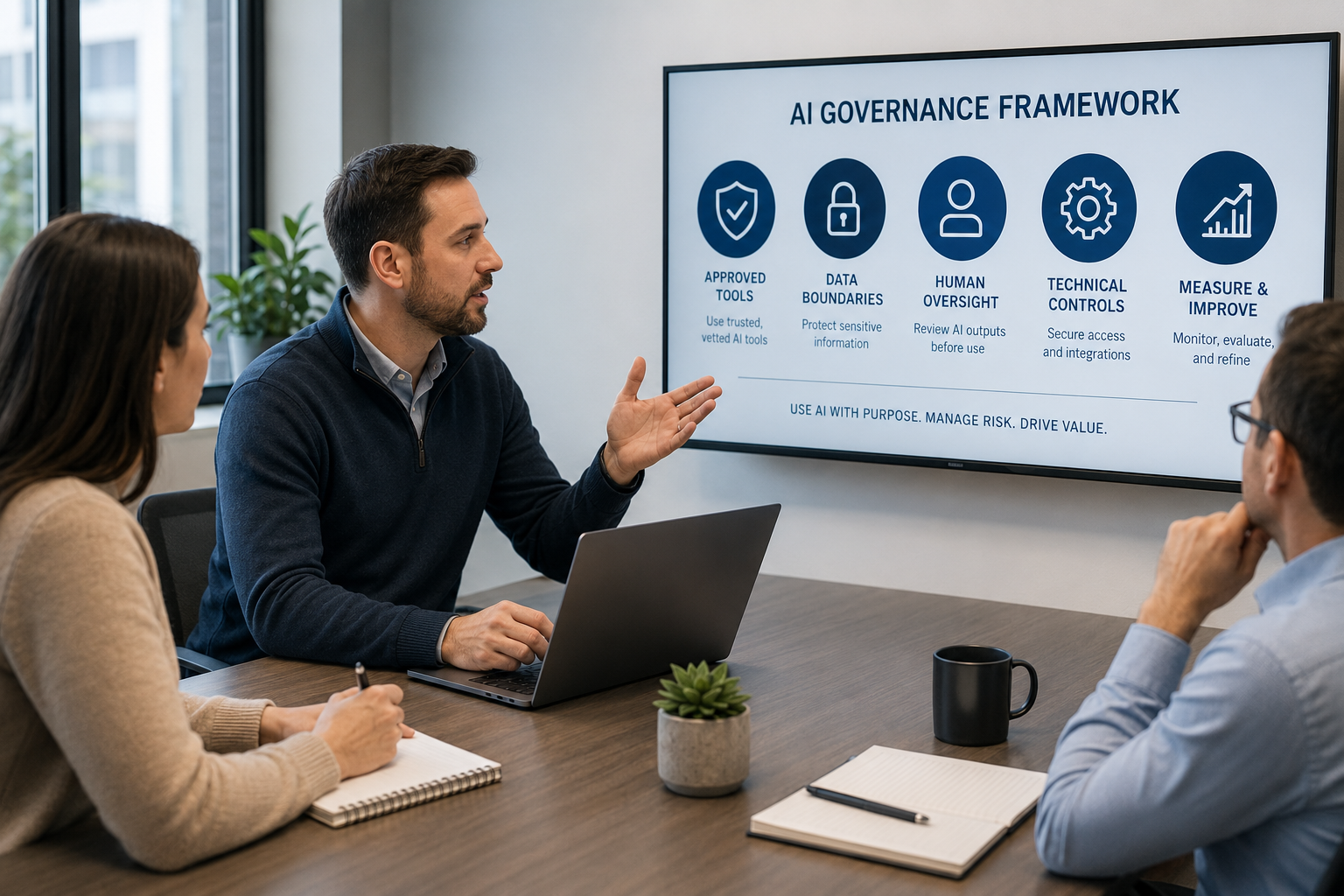
An AI automation IT strategy helps answer those questions. It gives businesses a practical framework for using AI safely, consistently, and strategically. The goal is not to block innovation. The goal is to help employees benefit from AI while protecting company data, customer trust, cybersecurity, and business accountability.
This guide explains why AI governance matters, what an acceptable use policy should include, which technical controls support safer adoption, how employee training fits in, and how business leaders can align AI automation with real business goals.
Why AI Automation IT Strategy Matters Now
AI adoption is moving faster than most internal technology policies. Employees do not always wait for a formal rollout because AI tools are easy to access, inexpensive, and immediately useful. That creates a gap between what leadership believes is happening and what employees are actually doing.
This gap can lead to shadow AI, data exposure, inaccurate outputs, unauthorized integrations, and unclear accountability. A business may believe it has not adopted AI, while employees are already using multiple AI tools with company data.
AI automation IT strategy matters because it creates visibility. It helps the business understand which tools are being used, what data is involved, what risks exist, and where AI can deliver the most value.
NIST’s AI Risk Management Framework is designed to help organizations better manage AI risks. NIST’s generative AI profile also helps organizations identify unique generative AI risks and consider actions that align with their goals and priorities.
For small and mid-size businesses, the practical lesson is clear: AI should be managed like any other business technology that touches data, customers, employees, decisions, or operations. It needs ownership, policy, security review, user guidance, and ongoing oversight.
The Difference Between AI Adoption and AI Strategy
AI adoption and AI strategy are not the same thing.
AI adoption happens when employees begin using tools. AI strategy happens when the business decides how those tools should support goals, reduce risk, and fit into existing technology processes.
Without strategy, AI use can become scattered. One department may use a writing tool. Another may use an AI note taker. Another may connect an AI assistant to customer data. Another may experiment with automation that affects workflows. Each team may make decisions independently, with no shared standards.
That creates avoidable problems:
- Employees may enter sensitive data into unapproved tools.
- Different teams may pay for duplicate AI subscriptions.
- AI-generated content may be used without review.
- Tools may connect to business systems with excessive permissions.
- Leadership may lack visibility into AI-related risk.
- Policies may be created only after something goes wrong.
A strategy brings order to adoption. It helps the business decide which AI tools are worth using, which use cases need more review, what data should be restricted, how automation should be approved, and how employees should be trained.
Da-Com’s managed IT and technology success services are built around technology alignment, vCIO guidance, business continuity, cybersecurity, and support for organizations that want technology to serve business goals instead of creating unmanaged complexity.
Why AI Governance Cannot Wait
Many leaders think AI governance can wait until the business has a larger AI program. That is risky. Governance is easier to build before habits, tools, and shortcuts become deeply embedded.
When governance is delayed, the business may later discover that employees have already uploaded confidential information, connected AI tools to business systems, used inaccurate outputs in client work, or created workflows that are difficult to unwind.
Governance does not need to be complicated. It simply needs to answer basic questions:
- Which AI tools are approved?
- Which AI tools are not approved?
- What data can be used with AI?
- What data is prohibited?
- Who approves new AI tools?
- Who reviews high-risk AI outputs?
- What integrations are allowed?
- How are AI tools monitored?
- What should employees do if they accidentally share sensitive data?
Early governance reduces confusion. It gives employees a safe path to use AI without guessing. It also helps leadership show customers, insurers, partners, and regulators that AI is being used responsibly.
CISA’s artificial intelligence resources provide guidance on AI cybersecurity, secure AI system development, and secure AI adoption. CISA also notes that fundamental cybersecurity practices still apply to AI systems, even though AI introduces unique risks.
Building an AI Acceptable Use Policy
The foundation of an AI automation IT strategy is an AI acceptable use policy. This policy should be clear, practical, and easy for employees to follow.
A good policy does not need to be overly long. It should help employees understand how they can use AI safely and when they need approval.
Approved Tools
The policy should list which AI tools are approved for business use. It should also explain what each tool is approved for. A tool may be approved for general writing support but not for confidential client data. Another tool may be approved for internal meeting notes but only if certain settings are enabled.
Tool Evaluation Process
Employees should have a clear way to request new AI tools. If there is no approval path, employees may choose tools on their own. A simple request process reduces shadow AI by giving employees a legitimate way to ask for useful tools.
Data Classification Rules
The policy should define what types of data can be entered into approved AI tools and what data cannot. Businesses should be especially careful with customer data, employee records, financial information, contracts, credentials, healthcare data, legal information, confidential business strategy, and proprietary processes.
Output Review Requirements
AI-generated content should usually be treated as a draft. The policy should explain when employees must review, fact-check, edit, or escalate AI-generated work before using it.
Prohibited Uses
The policy should clearly state what is not allowed. Examples may include using unapproved tools with company data, entering passwords into AI tools, using AI to make employment decisions without human oversight, or allowing AI-generated content to make promises the business has not approved.
Reporting Requirements
Employees should know what to do if they accidentally share sensitive data, discover inaccurate AI output, or learn that a new AI tool is being used without approval.
The FTC has warned AI companies to uphold privacy and confidentiality commitments, including promises not to use customer data for hidden purposes such as model training or updates. This makes vendor review and data handling especially important when businesses approve AI tools.
Data Boundaries: What Should and Should Not Go Into AI Tools
Data boundaries are one of the most important parts of AI governance. Employees need clear examples, not vague warnings.
Low-risk use cases may include brainstorming public blog topics, improving the tone of a generic internal message, creating a first draft from non-confidential information, or summarizing publicly available research.
Higher-risk use cases may include customer records, financial details, employee data, contracts, legal documents, medical information, security documentation, passwords, confidential meeting notes, client proposals, and proprietary strategy.
Businesses should create practical data categories, such as:
- Public data: Information already available to the public.
- Internal data: Business information that is not public but is not highly sensitive.
- Confidential data: Customer, employee, financial, contractual, or proprietary information.
- Restricted data: Regulated, legal, healthcare, security, credential, or highly sensitive information.
Then the policy should explain which categories can be used with approved AI tools and which require leadership, legal, compliance, or IT approval.
This approach helps employees make faster decisions because they do not have to guess every time.
Technical Controls That Support AI Governance
A written policy is important, but policy alone is not enough. Businesses also need technical controls that support safer AI use.
Network Visibility
Network monitoring can help identify which AI platforms employees are accessing. The goal is not to spy on employees. The goal is to understand the organization’s AI footprint so leadership can manage risk.
Data Loss Prevention
Data loss prevention tools can help identify or block sensitive data from being sent to unapproved destinations. For example, a DLP policy may alert IT if someone attempts to upload customer records, financial data, or protected information into an unapproved AI platform.
Identity and Access Management
Approved AI tools should use secure authentication. Multi-factor authentication should be enabled when available. User access should be removed when employees leave the company or no longer need the tool.
Integration Review
AI tools that connect to email, calendars, cloud drives, CRM systems, project management platforms, or financial tools need extra review. Integrations should be limited to the minimum permissions required.
Endpoint Management
Endpoint management can help prevent employees from installing unapproved AI applications or browser extensions that create data or security risk.
Logging and Reporting
Businesses should understand what logs are available from approved AI tools. Logs can help answer questions about who accessed a tool, what integrations were used, and whether unusual activity occurred.
Da-Com’s cybersecurity essentials for SMBs resource explains why small and mid-size businesses need practical protections such as monitoring, endpoint security, email protection, patch management, and incident response support.
Managing Shadow AI and Shadow IT
Shadow AI happens when employees use AI tools without approval. This is now one of the most common AI governance challenges for SMBs.
Employees often use shadow AI because they are trying to solve real problems. They want to save time, improve quality, summarize information, or automate repetitive work. The intent is usually positive. The risk comes from using tools that have not been evaluated.
Common shadow AI examples include:
- Free AI chatbots used with client information.
- AI meeting assistants joining calls without approval.
- Browser extensions that read emails or web pages.
- AI writing tools used for confidential documents.
- AI spreadsheet tools connected to business files.
- AI tools linked to cloud storage or CRM systems.
- Personal AI accounts used for company work.
The best response is not simply to ban AI. A strict ban may push usage further underground. A better approach is to provide approved tools, clear rules, and an easy request process.
Employees are more likely to follow policy when they understand that the goal is safe adoption, not stopping progress.
AI Automation IT Strategy and Business Goals
AI automation should not be adopted just because it is popular. It should support real business goals.
A strong AI automation IT strategy asks:
- Which manual tasks consume the most employee time?
- Which workflows are repetitive and low-risk enough to automate?
- Where would AI improve accuracy, speed, or consistency?
- Where would AI create too much risk or require too much review?
- Which departments are ready for AI adoption?
- Which tools integrate safely with existing systems?
- What outcomes should we measure?
Good AI strategy connects technology to business value. It may help reduce manual administrative work, improve customer response time, organize information faster, support employee productivity, or improve internal reporting. But each use case should be evaluated for data sensitivity, workflow impact, cost, accuracy, security, and human oversight.
This is where vCIO guidance can help. A virtual Chief Information Officer helps leadership evaluate technology decisions from a business strategy perspective, not just a tool perspective.
Da-Com’s vCIO benefits for SMBs resource explains how executive-level IT strategy helps businesses plan technology, manage risk, optimize cost, and align IT decisions with long-term goals.
Human Oversight and Accountability
AI automation can speed up work, but it should not remove accountability. Business decisions still need human ownership.
Human review is especially important for:
- Client-facing content.
- Legal documents.
- Financial analysis.
- HR decisions.
- Healthcare information.
- Compliance summaries.
- Security recommendations.
- Customer promises.
- High-impact business decisions.
AI-generated outputs can be incomplete, outdated, biased, or simply wrong. Even when they sound confident, they may need verification.
A practical AI automation IT strategy should define who is responsible for reviewing AI outputs. It should also define when AI can assist a workflow and when a person must approve the final result.
For example, AI may draft a customer email, but an employee should approve it before sending. AI may summarize a contract, but legal or leadership should review the summary before decisions are made. AI may suggest a process improvement, but managers should validate whether it fits actual operations.
Employee Training for Responsible AI Use
Policies only work when employees understand them. Training is a critical part of AI automation IT strategy.
Training should be practical and role-specific. Employees need examples that connect to their daily work.
Good AI training should cover:
- Which AI tools are approved.
- Which data cannot be entered into AI tools.
- How to request approval for a new AI tool.
- How to fact-check AI-generated content.
- Why AI output should be treated as a draft.
- How to identify risky AI integrations.
- What to do after accidental data exposure.
- How to use AI meeting tools safely.
- Why customer, employee, financial, and regulated data need extra protection.
The tone of training matters. Employees should not feel punished for wanting to use helpful tools. They should understand that responsible AI use protects the business, customers, coworkers, and their own work.
Training should also be updated regularly because AI tools change quickly. A policy created once and forgotten will become outdated.
AI Automation and Cybersecurity Risk
AI tools can introduce cybersecurity risk when they are connected to business systems, used with weak passwords, or adopted without review.
Cybersecurity concerns may include:
- AI accounts created with reused passwords.
- Tools without multi-factor authentication.
- AI browser extensions with broad permissions.
- AI tools connected to email or cloud storage.
- Vendor breaches exposing prompts or uploaded files.
- Prompt injection attacks against AI systems that process external content.
- Employees entering credentials or security information into AI tools.
- Unapproved automation taking actions without oversight.
AI automation can be helpful, but it should be connected carefully. An AI tool that can read emails, access files, or take actions inside business systems should be reviewed like any other high-risk integration.
CISA’s AI resources emphasize secure development, secure integration, and operational risk management for AI systems. This is especially important as businesses begin using AI tools that interact with sensitive workflows.
Building an AI Governance Review Cadence
AI governance should not be a one-time project. The AI landscape changes too quickly. New tools, new features, new integrations, new risks, and new regulations continue to emerge.
A practical review cadence may include quarterly or semiannual reviews of:
- Approved AI tools.
- Employee AI usage.
- New tool requests.
- Shadow AI findings.
- Vendor privacy updates.
- Security settings and integrations.
- AI-related incidents or near misses.
- Employee training needs.
- Changes in compliance requirements.
- Business results from AI automation.
This keeps the strategy current and useful. It also helps leadership see whether AI is delivering value, creating risk, or both.
AI governance should evolve with the business. A company just beginning with AI may only need a basic policy and approved tools list. A company using AI across multiple departments may need stronger technical controls, governance meetings, vendor reviews, and formal reporting.
Measuring AI Automation Success
Businesses should measure whether AI automation is helping. Otherwise, AI adoption can become a collection of tools without clear value.
Useful success measures may include:
- Time saved on repetitive tasks.
- Reduction in manual data entry.
- Improved response times.
- Fewer workflow bottlenecks.
- Employee adoption of approved tools.
- Reduction in shadow AI usage.
- Number of reviewed and approved AI tools.
- Accuracy or quality improvements after human review.
- Security incidents avoided or reduced.
- Cost savings from tool consolidation.
Measurement should include risk metrics too. A tool that saves time but creates data exposure may not be worth it. The best AI automation strategy balances productivity with privacy, security, compliance, and trust.
Questions Business Leaders Should Ask About AI Automation
Before expanding AI automation, leaders should ask practical questions:
- What AI tools are employees already using?
- Which tools are approved for company work?
- What data is allowed in approved tools?
- What data is prohibited?
- Who reviews new AI tools before adoption?
- Do approved tools use company data for model training?
- Are AI accounts protected with MFA?
- Which AI tools connect to business systems?
- Can AI outputs be used directly, or do they require human review?
- What happens if sensitive data is accidentally shared?
- How often will the AI policy be reviewed?
- How does AI support business goals?
If these questions do not have clear answers, the business may need a stronger AI automation IT strategy.
How Da-Com IT Pros Helps Businesses Build AI Boundaries
Da-Com IT Pros helps businesses across St. Louis, Columbia, Southern Illinois, and surrounding communities adopt technology safely and strategically. AI automation is an opportunity, but it needs the right boundaries.
Da-Com can help businesses with:
- AI tool evaluation.
- AI acceptable use policy development.
- Shadow AI discovery conversations.
- Data classification guidance.
- Cybersecurity controls for approved AI tools.
- Identity and access management.
- Multi-factor authentication planning.
- AI vendor risk review.
- Employee training and awareness.
- Secure integration review.
- vCIO strategy and technology planning.
- Ongoing governance reviews.
The goal is not to make AI adoption harder. The goal is to make AI adoption safer, clearer, and more useful for the business.
With the right strategy, employees can use AI confidently because they know which tools are approved, what data is safe, and when human review is required. Leadership can make better decisions because AI usage is visible, measured, and aligned with business goals.
Build Your AI Automation IT Strategy With Confidence
AI automation can help businesses work faster, reduce repetitive tasks, and improve productivity. But without clear boundaries, it can also create hidden risks around data privacy, cybersecurity, accuracy, compliance, and accountability.
A strong AI automation IT strategy gives your business a practical framework. It defines approved tools, sets data boundaries, guides employee behavior, supports secure integrations, requires human review when needed, and connects AI investments to business goals.
For small and mid-size businesses, this does not need to be overwhelming. Start with visibility. Identify what AI tools are already being used. Create a simple acceptable use policy. Approve safe tools. Train employees. Review integrations. Measure results. Update the strategy as AI changes.
To learn more about building a safe and effective AI automation IT strategy for your St. Louis or Southern Illinois business, contact Da-Com IT Pros today. Da-Com can help you develop practical AI governance policies, implement technical controls, reduce shadow AI risk, and align AI automation with your business goals.




Leave A Comment