
Business Printer Management: How Managed Print Services Reduce Printer Problems
Business printer management helps organizations reduce printer problems before they interrupt the workday. Most businesses do not think about printers, copiers, scanners, or multifunction devices until something goes wrong. The toner runs out before a deadline. A print job gets stuck in the queue. Employees cannot connect to the device. A copier stops scanning. A machine jams over and over. Suddenly, a small printer issue becomes everyone’s problem.
Printer problems rarely stay printer problems. They become productivity problems. Accounting cannot process invoices. Human resources cannot print onboarding documents. A school office cannot prepare packets. A medical office cannot scan paperwork. A front desk team cannot provide forms to customers. Managers start asking questions. Employees stop what they are doing. The office manager or IT contact gets pulled into another issue they did not have time for.
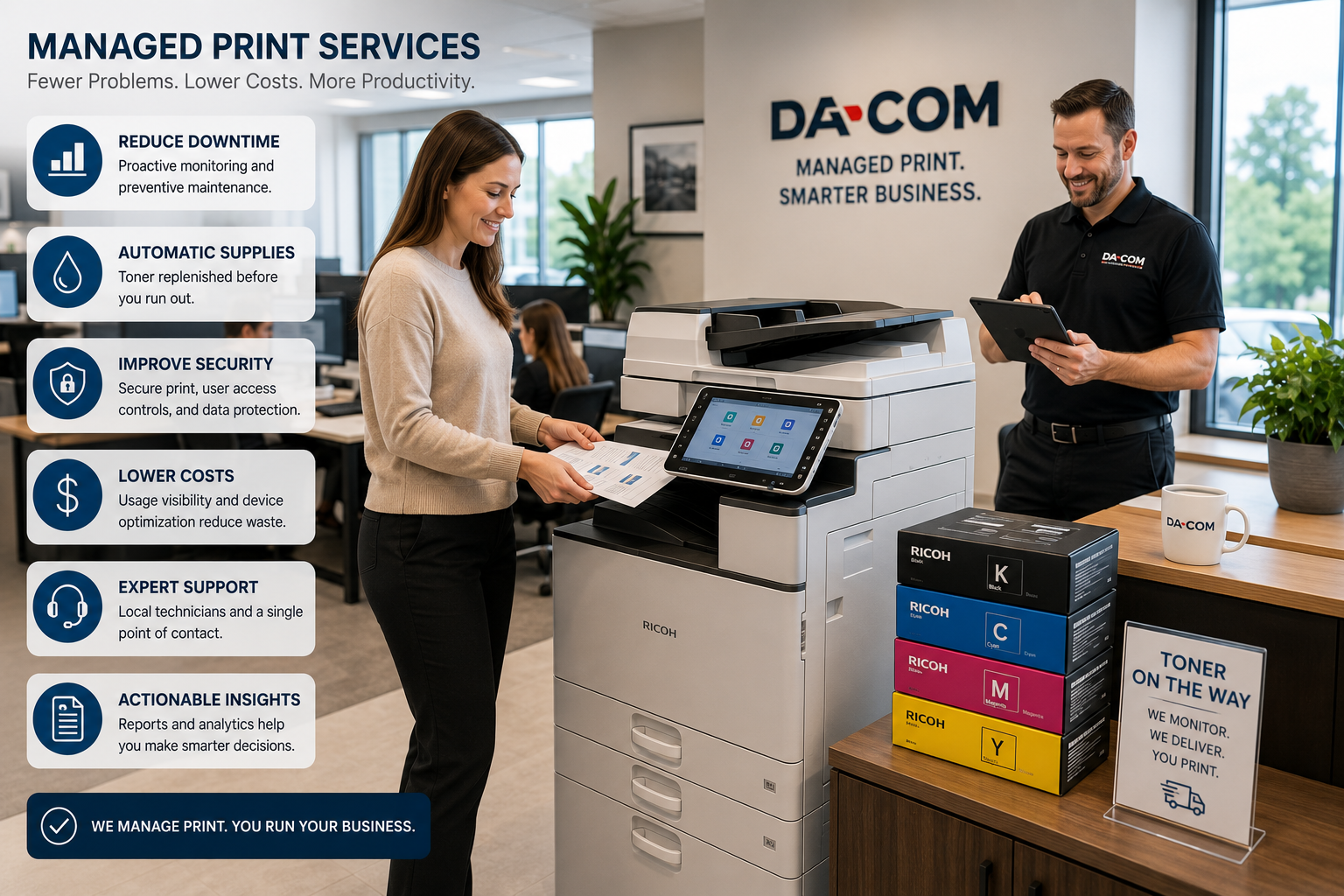
That is why many organizations are moving from reactive printer support to proactive Managed Print Services. Instead of waiting for devices to fail, toner to disappear, or costs to climb, a managed print provider monitors, supports, supplies, and optimizes the full print environment.
For businesses in St. Louis, St. Charles, Chesterfield, Clayton, Columbia, the Metro East, Belleville, Edwardsville, Collinsville, and Southern Illinois, business printer management can reduce downtime, improve visibility, simplify supplies, strengthen security, and make office technology easier to run.
Quick Answer: What Is Business Printer Management?
Business printer management is the proactive monitoring, maintenance, supply management, support, reporting, and optimization of an organization’s printers, copiers, scanners, and multifunction devices. It is often delivered through Managed Print Services, also called MPS.
A business printer management program may include:
- Printer fleet monitoring.
- Automatic toner replenishment.
- Preventive maintenance.
- Service and repair support.
- Usage reporting.
- Print cost visibility.
- Device optimization.
- Printer security guidance.
- Help desk support.
- Equipment recommendations.
- Consolidation or relocation of devices.
- One point of contact for print-related issues.
The goal is simple: fewer printer problems, fewer supply shortages, fewer emergency service calls, and fewer interruptions for employees.
Da-Com provides Managed Print Services to help businesses gain visibility and control over printing processes, improve the print environment, reduce wasteful printing habits, and simplify printer management.
Why Printer Problems Create Bigger Office Problems
Printer issues can look small from the outside. But inside a busy office, even a short disruption can create a chain reaction.
Common printer problems include:
- Recurring paper jams.
- Empty toner cartridges.
- Employees unable to connect to printers.
- Print jobs stuck in the queue.
- Slow printing.
- Scanning failures.
- Scan-to-email issues.
- Poor print quality.
- Devices going offline.
- Unclear error codes.
- Supplies ordered too late.
- Service calls taking too long.
When these issues happen repeatedly, employees start building workarounds. They print to a different department. They email files to someone else. They delay paperwork. They ask IT for help. They use a smaller desktop printer that costs more per page. They stop trusting the main device.
Those workarounds keep the day moving, but they are not efficient. Over time, unmanaged printing creates wasted labor, unnecessary costs, employee frustration, and avoidable downtime.
Business Printer Management vs. Traditional Printer Support
Traditional printer support is reactive. Something breaks, someone submits a service request, and the provider responds. That may solve the immediate issue, but it does not always prevent the same problem from happening again.
Business printer management is proactive. A managed print provider monitors devices, watches supply levels, reviews usage, tracks recurring issues, and helps the business make smarter decisions about the print environment.
| Category | Traditional Printer Support | Business Printer Management |
|---|---|---|
| Service model | Reactive repairs after problems happen | Proactive monitoring and ongoing support |
| Toner management | Manual ordering by employees | Automatic toner monitoring and replenishment |
| Cost visibility | Often limited | Usage reporting and print environment data |
| Fleet planning | Usually handled only during replacement | Ongoing optimization and recommendations |
| Security guidance | Often overlooked | Printer access, firmware, and document security review |
| Employee impact | More interruptions and workarounds | Fewer surprises and clearer support |
The difference is not only technical. It is operational. Traditional support fixes problems after they appear. Managed Print Services help prevent many of those problems from interrupting employees in the first place.
How Managed Print Services Reduce Printer Problems
Managed Print Services reduce printer problems by treating printing as a managed environment instead of a collection of disconnected devices. A business may have printers in multiple departments, desktop devices, shared copiers, multifunction printers, production equipment, and scanners. Without one clear management process, support becomes scattered.
A managed print provider helps bring structure to that environment.
1. Proactive Printer Monitoring
One of the biggest advantages of Managed Print Services is proactive monitoring. Instead of waiting for employees to report an issue, monitoring tools can track device status, supply levels, error codes, and performance concerns.
Monitoring may help identify:
- Low toner levels.
- Device errors.
- Paper jam patterns.
- Connectivity issues.
- Parts nearing end of life.
- Devices that are overused.
- Printers that are underused.
- Unusual print volume changes.
With better visibility, the provider can often address issues before they affect the entire office.
2. Automatic Toner Delivery
Toner shortages are one of the most common and preventable printer problems. Many offices still rely on employees to notice low toner, check supply closets, place orders, and hope the right cartridge arrives before the device stops working.
Managed Print Services can automate toner monitoring and replenishment. That means replacement supplies can be sent before the cartridge is empty.
Automatic toner delivery helps reduce:
- Last-minute supply runs.
- Overstocked supply closets.
- Incorrect cartridge orders.
- Employees hoarding supplies.
- Downtime from empty toner.
- Time spent manually tracking inventory.
For office managers, this can be one of the most immediate benefits of business printer management.
3. Faster Service and Fewer Emergencies
When a printer, copier, or multifunction device goes down, response time matters. A fast service response can reduce disruption, especially in offices that rely on printing and scanning every day.
Da-Com’s article on same-day copier service explains why response time matters when office technology problems interrupt printing, scanning, customer service, document workflows, and employee productivity.
Managed Print Services can also reduce emergency calls by identifying issues earlier. A device that repeatedly jams, runs low on supplies, or shows a warning code may need maintenance before it creates a bigger disruption.
4. Print Fleet Optimization
Many organizations have a print environment that grew by accident. A printer was added for one department. A copier was installed for another. Someone bought a desktop printer because the shared device was too far away. Over time, the business ends up with too many devices, mismatched models, inconsistent supplies, and unclear costs.
Print fleet optimization helps evaluate the entire environment.
A provider may review:
- How many printers and copiers are in use.
- Which departments print the most.
- Which devices have the most downtime.
- Which machines are too old or costly to maintain.
- Where devices should be relocated.
- Which printers can be consolidated.
- Which workflows depend on scanning or finishing features.
- Whether the fleet supports current and future needs.
The result is a healthier print environment that supports productivity while controlling unnecessary cost.
5. Reporting and Cost Visibility
Many businesses do not know what printing really costs. They may know lease payments or supply invoices, but they may not know which departments print the most, which devices cost the most to maintain, or where waste is happening.
Managed Print Services reporting can help answer questions such as:
- Which devices are used most often?
- Which devices are underused?
- Where are service calls increasing?
- Are color printing costs higher than expected?
- Which departments have the highest print volume?
- Which devices should be replaced?
- Where can printing be reduced or redirected?
Better reporting helps leaders make decisions based on real usage instead of guesses.
Business Printer Management and Printer Security
Printers and copiers are often overlooked in cybersecurity conversations. But modern multifunction printers are network-connected devices. They may store address books, process confidential documents, support scan-to-email, require user authentication, and connect to business systems.
The Cybersecurity and Infrastructure Security Agency provides guidance around securing network infrastructure devices and reducing risk across connected environments. You can review CISA resources here: CISA Secure Network Infrastructure Devices.
Printer security may include:
- Secure print release.
- User authentication.
- Access controls.
- Firmware updates.
- Hard drive procedures.
- Network configuration review.
- Scan-to-email security settings.
- Removal of unused features.
- Device retirement planning.
The National Institute of Standards and Technology Cybersecurity Framework helps organizations understand and improve how they manage cybersecurity risk. You can review it here: NIST Cybersecurity Framework.
Da-Com’s cybersecurity services can help organizations think through broader protection, monitoring, access control, and practical security improvements that connect with networked office technology.
Why Local Managed Print Services Matter
Many providers offer Managed Print Services, but local support feels different when employees are waiting. When a printer or copier is down, the business does not want confusion over who owns the issue. It needs someone who knows the environment, responds quickly, and communicates clearly.
Local managed print support can provide:
- Faster communication.
- Local technicians.
- Better familiarity with the customer environment.
- More personalized recommendations.
- Support for multiple local office locations.
- Long-term accountability.
- A stronger relationship after installation.
Da-Com’s About page notes that Da-Com is a customer-focused, family-owned company with more than 75 years in business. That local history matters when businesses want a managed print provider that is invested in long-term relationships and responsive regional support.
Managed Print Services for Different Industries
Healthcare and Dental Offices
Healthcare offices rely on forms, schedules, referrals, insurance documents, patient paperwork, and scanning workflows. Printer downtime can affect both administrative work and patient flow. Managed Print Services can help reduce supply shortages, improve uptime, and support secure document handling.
Schools and Education Offices
Schools often print packets, administrative records, forms, classroom materials, staff documents, and parent communications. Managed print support can help control costs, reduce waste, and keep devices reliable during busy school periods.
Legal and Professional Services
Law firms, accounting firms, insurance agencies, and financial offices depend on reliable printing and scanning for client records, contracts, reports, statements, and signed documents. Business printer management can improve uptime and reduce frustration during deadline-heavy work.
Manufacturing and Distribution
Manufacturers and distributors use printers and copiers for invoices, purchase orders, shipping paperwork, work orders, quality documents, and administrative records. Managed Print Services can reduce disruptions that affect both office and operational workflows.
Nonprofits and Local Government
Nonprofits and local government offices often need predictable costs, responsive service, and practical recommendations. Managed print can help reduce administrative burden and keep core document processes moving.
Business Printer Management and Sustainability
Managed Print Services can also support sustainability goals by reducing unnecessary printing, improving device efficiency, consolidating underused equipment, and encouraging smarter supply management.
ENERGY STAR explains that certified imaging equipment can save energy and money compared with conventional models. You can review its resource here: ENERGY STAR Imaging Equipment.
Managed print can support a more efficient print environment by helping organizations:
- Reduce unnecessary printing.
- Use devices more efficiently.
- Consolidate underused printers.
- Replace outdated equipment.
- Improve supply management.
- Track usage trends.
- Reduce wasteful habits.
The EPA also provides resources on sustainable materials management and waste reduction. You can review EPA sustainable materials guidance here: EPA Sustainable Materials Management.
How Managed Print Services Reduce Vendor Complexity
One of the biggest frustrations in office technology is vendor confusion. One company handles printers. Another handles copiers. Another handles toner. Another handles IT. When something breaks, no one knows who owns the issue.
That can lead to finger-pointing:
- The printer vendor says it is a network issue.
- The IT provider says it is a device issue.
- The supply vendor says the cartridge is correct.
- The office manager gets stuck coordinating everyone.
A managed print provider simplifies support by giving the organization one clearer path for printer, copier, supplies, service, and print environment questions.
Da-Com also supports office equipment, managed IT, cybersecurity, document management, wide-format printing, and office supplies, which can help reduce vendor complexity across the workplace technology environment.
Signs Your Business Needs Better Printer Management
Your organization may benefit from business printer management if:
- Employees frequently report printer issues.
- Toner shortages happen regularly.
- You manage multiple printer brands.
- Service calls are increasing.
- Your IT team spends too much time on printer problems.
- Print costs are difficult to track.
- Employees avoid certain devices because they are unreliable.
- You have aging equipment with no replacement plan.
- Different departments manage printing differently.
- You work with multiple vendors for print-related needs.
- You are unsure which devices are overused or underused.
- Printer security settings have not been reviewed.
If several of these sound familiar, the print environment may be creating more work than it should.
What to Ask Before Choosing a Managed Print Provider
Before choosing a provider, ask questions that reveal how the program will work after the agreement is signed.
- What devices will be included in the managed print program?
- Do you monitor printer status and supply levels?
- How does automatic toner replenishment work?
- How are service calls submitted?
- Are technicians local?
- What response times should we expect?
- Will we receive usage reports?
- How do you identify overused or underused devices?
- Can you help reduce unnecessary printing?
- Do you review printer security settings?
- Can you support multiple office locations?
- Can you coordinate with our IT team?
- How do you recommend repair vs. replacement?
- How often do you review the print environment?
A strong managed print provider should be able to explain the process clearly and show how the program reduces problems, not just how it bills for devices.
Common Mistakes Businesses Make With Printer Management
Waiting Until Printers Break
Reactive support may fix the immediate issue, but it does not prevent recurring problems. Proactive monitoring can reduce surprise interruptions.
Ordering Toner Manually
Manual toner ordering often leads to shortages, overstocking, or incorrect cartridges. Automated replenishment makes supply management easier.
Ignoring Small Desktop Printers
Small desktop printers can be expensive and hard to manage. A full print assessment should include all devices, not only the largest copiers.
Not Reviewing Print Security
Networked printers process sensitive documents and should not be ignored in security planning.
Choosing a Provider Based on Price Alone
The lowest monthly cost may not create the best value if service is slow, toner is unreliable, or the equipment does not fit the workflow.
Frequently Asked Questions About Business Printer Management
What is business printer management?
Business printer management is the proactive monitoring, maintenance, supply management, support, reporting, and optimization of an organization’s printers, copiers, scanners, and multifunction devices.
What are Managed Print Services?
Managed Print Services are ongoing printer management programs that help monitor, maintain, optimize, supply, and support an organization’s print environment.
How do Managed Print Services reduce printer problems?
Managed Print Services reduce printer problems through proactive monitoring, automatic toner replenishment, preventive maintenance, faster service, usage reporting, fleet optimization, and security guidance.
Do Managed Print Services include toner?
Most managed print programs include toner monitoring and replenishment. The exact terms depend on the provider and agreement.
Can Managed Print Services lower print costs?
They can help reduce unnecessary costs by improving visibility, consolidating underused devices, reducing waste, automating supplies, and identifying inefficient equipment.
Are Managed Print Services only for large companies?
No. Small businesses, schools, nonprofits, churches, healthcare providers, professional offices, manufacturers, and multi-location organizations can all benefit from managed print support.
Can Managed Print Services improve printer security?
Yes. Managed print providers can help review device access, firmware updates, secure print options, network settings, and document security practices.
Why choose a local managed print provider?
A local provider can often offer faster response, better communication, familiar technicians, stronger accountability, and more personalized support than a distant or highly centralized provider.
The Bottom Line: Fewer Printer Problems, Fewer Fires to Put Out
Most organizations are not looking for another vendor. They are looking for fewer interruptions. Fewer toner shortages. Fewer service surprises. Fewer print queues stuck at the worst time. Fewer employees walking into the office manager’s workspace asking why the printer is not working.
Business printer management helps create that outcome. With the right Managed Print Services program, organizations can monitor devices, automate toner, reduce downtime, improve security, gain visibility, and make smarter decisions about the full print environment.
When printers, copiers, scanners, and multifunction devices are managed well, office technology fades into the background where it belongs. Employees can spend less time dealing with printer problems and more time doing the work that matters.
To learn more about business printer management, Managed Print Services, printer support, and print fleet management for your St. Louis, St. Charles, Chesterfield, Clayton, Columbia, Metro East, Belleville, Edwardsville, Collinsville, or Southern Illinois business, contact Da-Com today. Da-Com can help reduce printer problems, improve uptime, simplify toner management, and make your office easier to run.





Leave A Comment