
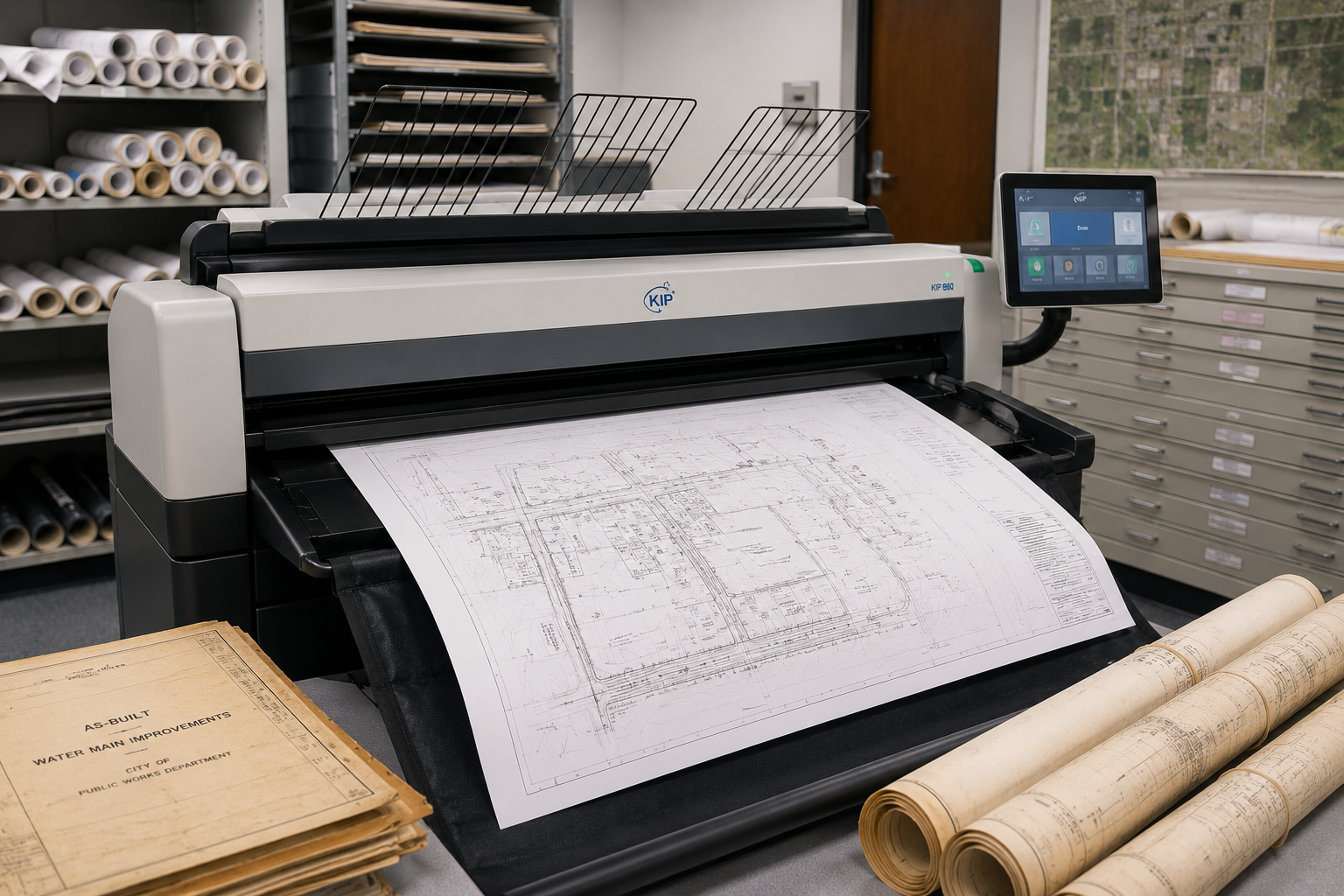
Large Format Scanning for Government Plan Archives
Large format scanning can take a lot of pressure off a government team that still depends on old plan archives. Public works departments, city engineers, county offices, school districts, sewer districts, water districts, planning teams, parks departments, and facilities teams often rely on oversized records that were created long before today’s digital workflows.
A crew may need an old utility drawing before digging starts. A facilities manager may need a floor plan before a renovation meeting. A city engineer may need an as-built before answering a contractor. A planning team may need a subdivision plat before a public hearing. A public works director may need a map that is sitting in a tube, flat file, cabinet, records room, basement, or storage space that no one has opened in years.
That search can take hours. Sometimes it takes days. And when the plan is finally found, it may be faded, torn, curled, marked up, out of order, or too fragile for daily use.
That is why scanning old government plans matters. It helps turn paper plans, maps, plats, drawings, and as-builts into digital files your team can find, share, protect, and reprint when the next deadline hits.
For public agencies in St. Louis, St. Louis County, St. Charles County, Madison County, St. Clair County, the Metro East, Southern Illinois, and nearby communities, this is not just a storage project. It is a way to protect project history, reduce staff time, support records access, and help the right people get the right document before work slows down.
Why Government Plan Archives Become a Problem
Most government teams have old plans for a good reason. A city may have decades of street drawings. A county may have drainage records. A school district may have building plans. A sewer or water district may have utility maps. A parks department may have trail maps, site plans, and facility drawings. A public works team may have as-builts from projects completed long before today’s staff joined the agency.
Those records still matter.
The problem is that paper archives were not built for how teams work today. Paper plans can be hard to search. Staff may remember that a drawing exists, but not know where it is. File labels may not match current project names. Drawings may be stored by year, location, department, project number, contractor, street name, or whoever last touched them.
That creates risk.
A missing plan can slow a project. A wrong revision can confuse a field crew. A damaged original can remove a record your agency still needs. A delayed records search can take staff away from inspections, project updates, resident calls, plan reviews, council packet preparation, and deadline-driven work.
Many public agencies are also operating with limited time and staff capacity. When someone spends half a day digging through flat files, that is half a day they cannot spend moving current work forward.
A digital plan archive helps solve that problem by making older records easier to locate and use.
Da-Com’s advanced scanning solutions help organizations convert paper documents into indexed, retrievable digital files, which can support teams that need faster access to old plans, drawings, and records.
Large Format Scanning Helps Protect the Right Version
Old plans often carry project history that cannot be recreated quickly. A handwritten mark on an as-built may show what changed in the field. A utility map may show a line that never made it into a newer system. A building drawing may show a wall, valve, panel, access point, or mechanical area that matters during repair work.
When those plans stay only on paper, they are exposed to wear, water, dirt, fading, misfiling, daily handling, and accidental damage.
A digital archive gives your team another way to protect that information.
It also helps with version control. Government teams know how much stress the wrong version can create. A contractor, inspector, engineer, or field crew may assume they have the correct plan. If they do not, the mistake can lead to rework, delays, confusion, or avoidable questions.
With a scan-to-digital process, files can be named by project, location, date, sheet number, revision, department, asset type, or record category. That makes it easier for staff to know what they are opening and what they are sharing.
The goal is simple: your team should not have to guess. Staff should be able to find the right version, use it, share it appropriately, and move on.
What Belongs in a Government Plan Archive
Every agency is different, but many public-sector archives include the same kinds of oversized documents. These may include:
- Street plans.
- Bridge drawings.
- Drainage plans.
- Sewer and water drawings.
- Stormwater maps.
- Parcel maps.
- Zoning maps.
- Subdivision plats.
- Building floor plans.
- Facility drawings.
- School campus plans.
- Park maps.
- Trail drawings.
- Airport or transit facility plans.
- Public meeting exhibits.
- As-built drawings.
- Project closeout drawings.
- Emergency response maps.
- Utility location maps.
- Historic district maps.
- Capital project plans.
These records help teams answer real questions. Where is the line? What was built? Which version was approved? What did the old plan show? What does the crew need before going into the field? What does the public need to see before the meeting? What does the contractor need before work starts?
For St. Louis and Southern Illinois government teams, public works, transportation, planning, zoning, GIS, facilities, schools, sewer and water departments, stormwater teams, parks departments, and emergency management groups all have recurring needs for large plans, maps, and archival scanning.
The records may be old, but the questions they answer are current.
Large Format Scanning Is About More Than Storage
It is easy to think of scanning as a storage task. For government teams, it is bigger than that.
Scanning old plans can help your team work with less stress. When documents are digital, staff can search by file name, project number, location, address, building, sheet type, department, or folder. They can send a file without pulling the original. They can reprint only the sheets they need. They can share a PDF with an engineer, inspector, contractor, records clerk, department head, or public-facing staff member.
That saves time.
It also helps protect fragile originals. Some old drawings should not be handled every time someone needs a copy. The more they are opened, rolled, flattened, copied, marked, and moved, the more damage they can take.
A clear digital file lets the original stay protected while the working copy does the daily work.
This matters when records have long-term value. The National Archives notes that digitization is part of many agencies’ move toward electronic government and provides guidance resources for federal agencies transitioning toward electronic records. You can review NARA’s digitization resources here: National Archives digitization guidance.
Federal rules also address digitizing permanent paper records, including oversized records. 36 CFR Part 1236, Subpart E covers standards and procedures for digitizing permanent paper records, including maps, posters, drawings, bound volumes, and other paper-based documents. You can review the eCFR rule here: 36 CFR Part 1236, Subpart E.
Local agencies still need to follow their own retention requirements and records policies. The goal is not simply to scan and discard paper. The goal is to build a careful process that supports access, records rules, preservation needs, and daily work.
A Calm Process for Scanning Old Plans
A good archive project should feel organized from the start. The process does not have to be overwhelming if it is broken into clear steps.
1. Identify the Records That Matter Most
Many teams start with the plans that create the most daily pain. That may include facility drawings, public works as-builts, sewer maps, road plans, utility maps, zoning maps, or old plats. Starting with the highest-use records gives the team relief faster.
2. Sort Documents Into Clear Groups
Records can be grouped by department, building, project number, year, address, street, asset type, box number, or retention category. The goal is to create enough structure so scanning does not produce a confusing pile of digital files.
3. Decide How Files Should Be Named
File naming matters more than many teams realize. A clear file name can save staff time every time the file is used. The naming plan should be decided before scanning begins.
4. Scan Drawings With Care
Large plans may be curled, taped, faded, wrinkled, fragile, or damaged. Some need slower handling. Some need extra care before they can be scanned safely. Fragile originals should be treated differently than clean, modern drawings.
5. Review the Digital Files
After scanning, files should be reviewed for image clarity, missing pages, cut-off edges, page order, file names, and folder placement. Quality review helps prevent frustration later.
6. Deliver Files in a Useful Format
Files may be delivered as PDFs, organized folders, indexed batches, shared drive uploads, external drive exports, or cloud-ready files, depending on the agency’s workflow.
7. Decide What Happens to the Originals
Some originals may return to storage. Some may need records review. Some may need to be retained because of retention rules. Some may support reprint-on-demand work. The agency should decide this based on its records policies.
The best scanning process should make staff feel more in control, not more burdened.
File Naming Can Make or Break the Archive
Scanning old plans is only helpful if people can find the scans later. That is why file naming is so important.
A folder full of files named “Scan001,” “Scan002,” and “Scan003” will not help your team during a rush. A clear naming structure can.
A file name may include:
- Department.
- Project number.
- Street name.
- Facility name.
- Building name.
- Sheet number.
- Plan type.
- Revision date.
- Final or draft status.
A public works file might be named by project number, road name, sheet number, and date. A facilities file might be named by building, floor, sheet type, and revision date. A planning file might be named by development name, parcel, exhibit type, and hearing date.
There is no single perfect format. The right format is the one your team will understand and use.
Da-Com’s document management solutions help organizations think through how documents are classified, routed, stored, and retrieved. That same mindset is useful when planning a digital archive for oversized drawings and maps.
Scanning Old Government Plans Helps With Public Records Requests
Government teams often have to respond to records requests, internal reviews, resident questions, project questions, contractor questions, and department research.
When records are stored only on paper, each request can create a scramble. Someone has to find the plan. Someone has to check whether it is the right file. Someone has to make a copy or scan it. Someone has to return the original. If the record is large, fragile, or stored off-site, the process gets harder.
Digital files can make that work easier. They give staff a faster way to locate, review, and share records while still following agency rules.
This does not remove the need for records review. Your agency still has to follow its own policies, retention schedules, and public records requirements. But a clean digital archive can make the process calmer.
Less digging. Less guessing. Less staff time. Fewer last-minute problems.
For local government teams, retention requirements vary by state and record type. Missouri’s Secretary of State provides local government records retention schedules through its Local Records Program. You can review Missouri retention resources here: Missouri local government records retention schedules.
Illinois public agencies can also review records management and disposal resources through the Illinois State Archives. You can review Illinois records management resources here: Illinois State Archives records management programs.
Plan Archives Help Field Crews Work With Confidence
A plan archive is not only for the office. It can also help people in the field.
Crews may need a map before a repair. Inspectors may need a plan before checking work. Engineers may need an as-built before answering a question. Facilities staff may need a drawing before opening a wall, ceiling, utility area, or mechanical room.
When the archive is hard to search, field work can slow down. When the archive is clear, the right file can be found faster.
That can help crews work from better information. It can also reduce the chance that someone uses an outdated sheet because it was the only one they could find.
Government work often depends on field-ready information. A strong archive supports accurate plan sets, field drawings, maps, secure file handling, and reprint-on-demand work. That kind of support matters when the deadline is real and the team cannot afford confusion.
Da-Com’s wide format printer solutions can help teams that need to reprint maps, plans, drawings, public meeting boards, and large-format documents after old files have been digitized.
Scanning Helps When Internal Staff Are Stretched
Many agencies have skilled staff who can handle a lot. But that does not mean they should spend hours scanning, sorting, naming, and checking old plans when a better process is available.
The hidden cost of archive work can be larger than it looks. It may seem simple from the outside, but once boxes come out, the work grows.
The plans may not be sorted. The sheets may be out of order. Some drawings may be fragile. Some sheets may be mixed with unrelated projects. Some labels may be hard to read. Some plans may need to be scanned again. Some files may need to be renamed.
That work can take staff away from the work only they can do.
Scanning gives your team relief. It lets staff stay focused on public works, planning, facilities, inspections, procurement, field questions, resident needs, and active projects. The archive project still gets done, but it does not take over the team’s week.
For agencies trying to control print and document workflows more broadly, Da-Com’s managed print services help organizations gain visibility and control over print environments, supplies, usage, and support needs.
Secure File Handling Matters for Sensitive Plans
Some government plans are sensitive. Facility layouts, utility maps, school plans, public safety maps, law enforcement areas, emergency response materials, and critical infrastructure drawings should be handled with care.
That is why secure file handling should be part of the scanning plan.
Your team should know:
- Who has access to the files.
- How files are transferred.
- How long files are kept.
- How final delivery will be handled.
- Who is authorized to approve file names or folder structures.
- Who is authorized to receive completed files.
- What happens to working copies after delivery.
A simple process can include controlled upload, named contacts, clear folders, restricted access, and agreed file-retention steps after the project is complete.
This is not about making the process hard. It is about making it safe and clear.
Government teams need vendors who understand sensitive files, purchase orders, project numbers, department codes, deadline pressure, and clear documentation. The scanning process should support those needs from the first box to the final delivery.
When to Start a Plan Archive Scanning Project
Many teams wait until a deadline forces the issue. A project starts. A question comes up. A plan is needed. Someone searches. The file is missing. The team loses time.
The better time to start is before the rush hits.
You do not have to scan every record at once. A phased approach can work well.
Start with:
- The most-used records.
- The most fragile records.
- One department.
- One building.
- One project type.
- The plans that cause the most staff time loss.
For example, a city might begin with public works as-builts. A school district might begin with facility drawings. A county might begin with highway plans. A sewer district might begin with pump station drawings. A planning office might begin with plats and zoning maps.
Small starts can still create real relief. Once the team sees how much easier it is to find and reprint documents, the next phase becomes easier to plan.
How to Prepare Plans Before Scanning
A little preparation can make the scanning process smoother. Before sending plans for scanning, decide which group of records should be scanned first. It also helps to remove duplicates when possible, separate damaged sheets, and flag any documents that need special handling.
Your team may also want to mark priority records. “Scan first” may include current facilities, active project areas, high-request records, or drawings tied to upcoming construction.
It is also helpful to choose one person who can answer questions. That person does not have to manage every detail, but having one approved contact helps avoid delays when a file name, sheet order, or folder label needs a decision.
Before scanning, consider:
- Which records are highest priority?
- Are duplicates mixed in?
- Are fragile sheets separated?
- Are documents sorted by project, department, or location?
- Does the team have a preferred file naming structure?
- Are any files sensitive or restricted?
- Who can answer project questions?
- How should completed files be delivered?
The goal is to avoid surprises. When the process is clear at the start, the final archive is more useful at the end.
What to Look for in a Scanning Partner
For government plan archives, the right scanning partner should understand more than equipment. You need someone who understands your deadline, records, staff time, and need for a clean process.
Look for help with:
- Oversized plan scanning.
- Fragile original handling.
- Clear file naming.
- PDF organization.
- Batch scanning.
- Folder structure.
- Secure file transfer.
- Reprint-on-demand support.
- Project-number billing.
- Purchase-order friendly invoicing.
- Local pickup and delivery.
- Careful communication.
You should not have to chase the job. Your team should know what is being scanned, how files will be named, when files will be ready, and how they will be returned.
That is what makes the work feel calm.
Make Old Plans Easier to Find Before the Next Deadline
Old plan archives can feel like a quiet problem until the day they become urgent. Then everyone needs the file now.
Large format scanning gives government teams a better way to prepare. It helps turn paper plans, maps, plats, and drawings into digital files staff can find, share, protect, and reprint.
It can reduce time spent searching. It can protect fragile originals. It can support public records work. It can help crews work from the right version. It can make facilities, planning, public works, utilities, schools, and GIS teams more prepared.
Most of all, it can remove one more preventable problem from a busy government workday.
For government teams in St. Louis, St. Louis County, St. Charles County, Madison County, St. Clair County, the Metro East, Southern Illinois, and nearby communities, Da-Com can help make your plan archive easier to search, easier to share, and easier to trust before the next deadline hits.
To learn more about large format scanning, government plan archives, digital records, wide format reprints, and document workflow support for your public agency, contact Da-Com today. Da-Com can help your team build a simple scan-to-digital plan that starts with the records you need most.
“`



Leave A Comment